
Chromebook the fourth

Two years ago, I bought my mother her third Chromebook. The 2012 and 2014 ones were good choices. The 2019 was when I learned about the secret Chromebook end of life policy and inadvertently bought a Chromebook that expired in only two years. So here we are again.

I went the Best Buy like the last three times. This time I chose to use Best Buy online so I could easily return it if it didn’t work. However, i did not go to the store to buy it. Instead, I started by looking at the expiration dates.

Selecting a model

I started by making a list of all the Chromebooks that expire in 2028 or 2029. Then I looked at screensize, CPU, hard drive and connectors. I also confirmed there was a security slot for my mother’s existing Kensington lock.

Comparing the stats from 2 years ago

Last time I got my mother a laptop with good speakers for music. This time, the speakers aren’t as good so I got her external speakers. This laptop cost twice as much as last time. However, I didn’t know I was getting such a good deal last time because the machine was due to expire.

Acer (2019)Acer (2021)
Screen size15.6″14″
Price$240$479
CPUIntel 1.6 GHzIntel 2.6 GHz
RAM4 GB4GB
Hard Drive16GB54GB
USB2 USB 3.02 USB 3.0 + 2 USB C
HDMIYesNo. Bought USB C to display port adapter
Weight4.41 lbs3.42 lbs
Headphone jackYesYes
Battery life12 hours10 hours

Setting up the Chromebook

  • I got started and connected to my home wiki.
  • Signed in as both my mother and myself. Also uploaded a profile photo for me that she likes better than my gmail one.
  • Confirmed the wallpaper was solid light blue
  • Made a recovery disk. I installed the ChromeBoook recovery utility on my Chrome browser on Mac to do so.
  • Accepted Google Play/Google Drive since I want to use an app. I did not enable location services.
  • Tested the all four USB ports headphones and that a Kensington security lock works
  • On settings
    • disabled Bluetooth
    • disabled sync for passwords/addresses/google pay
    • changed time zone to Pacific
    • turned off check if have payment methods saved
    • on site settings, set microphone and camera to ask before recommended
  • Installed Keep Awake browser extension
  • Covered camera
  • Finally, I deleted a bunch of apps. This time I did it from the Chrome OS settings so I didn’t need to right click. I left amazon music, chrome, files, gmail, play store and web store. I also plan to install Zoom but waiting to do that together so my mother can learn how to install an app
opening multiple intellij modules in the same project and remembering them on reopen

This is the number one problem that has prevented me from using IntelliJ more and I finally know how to do it. (I’ve known how to open multiple modules for over a year. What I learned yesterday at the IntelliJ 20th anniversary conference was how to reopen that same set)

Note about terminology to Eclipse users

If your primary IDE is Eclipse, keep this difference in terminology in mind as you read this.

EclipseIntelliJ
WorkspaceProject
ProjectModule

Step 1: Create a dummy/grouping project

Create a new project. This project’s purpose is to contain the modules you want together and give it a distinct name. I’ve been keeping them in an IntelliJ folder in my home directory to avoid confusion. (Most of my stuff is under the git folder in my home directory). The idea of keeping them separate is so I know there’s not code in there.

Step 2: Add your modules

There are several ways of adding modules. Any of them are fine. I find the fastest for repeated adds is:

  • File > Project Structure > Modules
  • Click “+”
  • Choose “Import module”
  • Navigate to the build file (ex pom.xml) or .iml file for generic projects

Step 3: Rename the project (if needed)

On rare occasions, I noticed the project name got my first module name. I couldn’t reproduce this, but started double checking. This name is what will show up in your recents list.

  • File > Project Structure > Project
  • Enter a new name if needed

Testing

File > Open Recents and open another project. Then File > Open Recents and open this project. Admire how all your modules are back!

Seeing the modules on disk for the curious

In the dummy project, the .idea directory has a misc.xml file. I was told it contains all the modules. And it did when I tested on Windows

<list>
  <option value="$USER_HOME$/git/myProj/pom.xml" />
  <option value="$USER_HOME$/git/myProj2/pom.xml" />
</list>

When I tested on Mac, modules.xml had this info

<modules>
   <module fileurl="file://$USER_HOME$/git/myProj.xml" filepath="$USER_HOME$/git/myProj.xml" /> 
   <module fileurl="file://$USER_HOME$/git/myProj2.xml" filepath="$USER_HOME$/git/myProj2.xml" /> 

</modules>

And a note about “you are doing it wrong”

I am an Eclipse power user and an IntelliJ competent user. What holds me back is not using IntelliJ more at work because of not knowing how to do this. While I don’t want to replace my usage, I do want to be an IntelliJ power user and use Eclipse enough to not lose my skills! I think this is the thing that will do it!

When I’ve tried to find out how to add multiple modules and have them remembered multiple times in the past, I was told that I was “using IntelliJ wrong” and should have one project that I focus on. (I work on many sets of small related projects; that model doesn’t work for me.)

Yesterday, someone attempted to tell me that I should have one big project that I focus on at a time. (aka my problem doesn’t exist.) After explaining what I do, another user said he does that I do. The first user said something about religion. That seems like just it. There’s multiple religions. It’s fine to be passionate and a true believer in yours. But as part of society, accepting that other people believe differently is part of life.

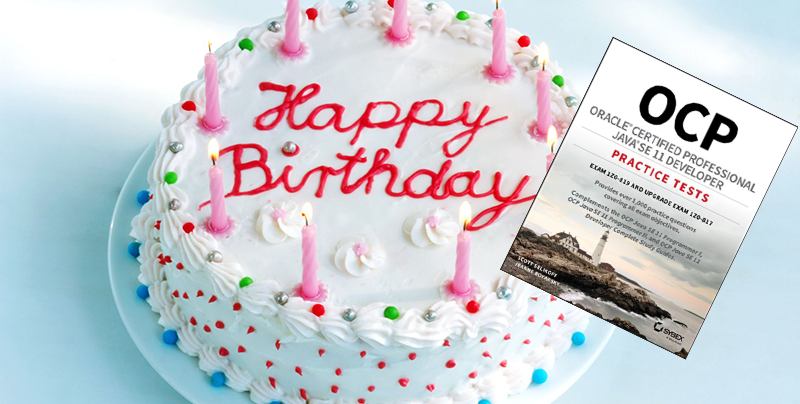
Happy Book Birthday! OCP Java 11 Practice Tests Now Shipping!

Jeanne and I are ecstatic to announce our new book, OCP Java 11 Practice Tests, is now shipping! It’s the first book in print custom written for the new 1Z0-819 Java 11 Certification Exam as well as the 1Z0-817 Java 11 Upgrade Exam.

Want to become Java 11 Certified but not sure where to start? Purchase our new Java 11 Practice Tests book along with our Java 11 Complete Study Guide, now available as The Java 11 Complete Certification Kit. While Oracle restructured the 1Z0-815 and 1Z0-816 Exams into the 1Z0-819 Exam, the material is almost identical (see this post for more details), making the Java 11 Complete Study Guide along with our new Java 11 Practice Tests Book the best source of material for learning everything you need to become a Java 11 Certified Professional!

Like our previous books, we will post any updates or notes on this blog’s Java 11 Practice Tests Book page.

A special thanks to all of our friends and family that helped write this book in the midst of the global pandemic. It’s been a challenging year and we couldn’t have done it without your support!