Error’d: European Edition

I traveled to the UK earlier this month and was greeted by an error screen a day for the first three days of my trip.

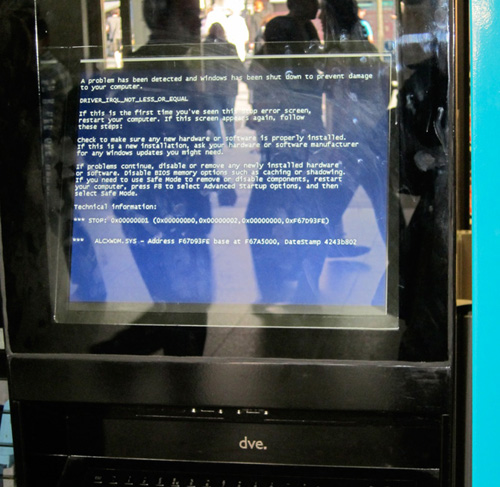
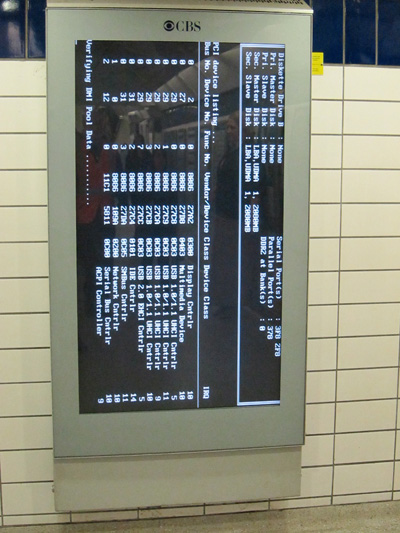
Day 1: London Subway Station
Nothing like a 5-foot-tall boot screen to make you feel at home in a foreign country.


Day 2: Cardiff Train Station
Found a Windows BSOD while waiting for the train. And they say Linux dominates the European market!


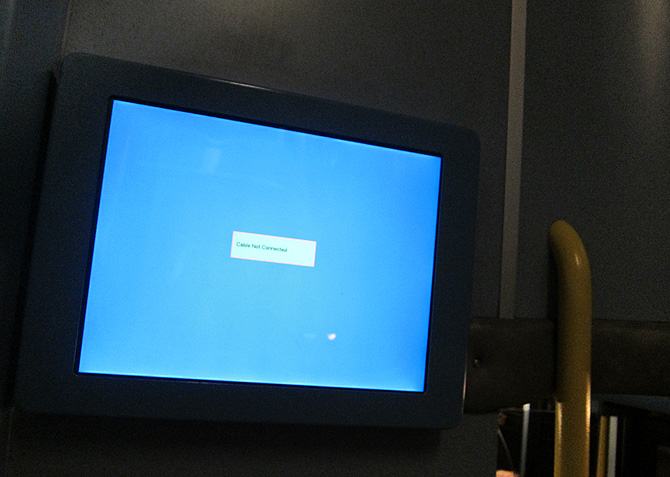
Day 3: London Bus
Found half-way up the stairs of one of London’s famous double decker public buses.


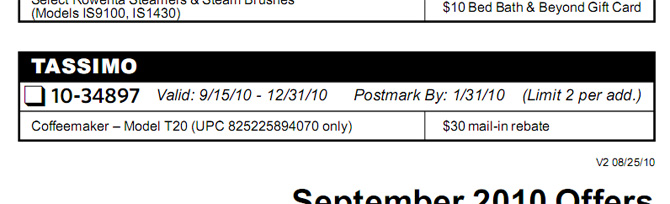
Bonus: Bed Bath & Beyond
So as not to forget American-based errors, here’s one I came across this morning (live for now). Those without time machines are at a severe disadvantage for this Bed Bath & Beyond rebate offer!


By the way, it was an excellent trip, with or without the BSOD’s following me around Europe!

eclipse 3.6 (helios) – four good, 1 bad feature

Last summer, I wrote “eclipse 3.5 – four good, 1 bad feature“.  A year later and Eclipse 3.6 is out.   I didn’t try it earlier because I was busy with the SCEA part 1 and Core Spring 3 certifications.  While I may not be part of the official blogathon this time, I decided to use the same format as I did last year for Eclipse 3.5.  Another big difference is that I’ve only been using Eclipse 3.6 for a couple days this time.

Getting started

Quick install with favorite plugins:

My Eclipse 3.5 workspace was in a good state so I decided to use it for 3.6 development.  I did make a copy of it in case I wanted to go back to 3.5.  It wasn’t too time consuming to download/install “Eclipse IDE for Java EE Developers”.  The download was 206 MB, so I left that alone for a little while.  I also installed the plugins I use regularly as I wanted them installed before switching to do development in the new workspace.

  1. Sysdeo – For Tomcat with Eclipse.
  2. Ecl emma – For code coverage.
  3. PMD – For static analysis.
  4. Subversive – For Subversion connectivity.

Workspace setup:

None!  That’s right.  My settings were preserved.  Even settings for the plugins.  I was impressed with how smoothly this went.

Features

Favorite feature #1 – Subversive

The Subversive plugin was updated quite extensively with the Helios release train.  I have a lot to say on this so it is a whole other blog post.

Favorite feature #2 –Virtual Folders

Virtual folders are like a folder of shortcuts.  While you can’t put any “real” files under them, you can put other virtual folders and linked resources.  This has potential.  It means I can put related data together even if it lives in disparate places.

Favorite feature #3 – WORKSPACE_LOC

When you create a linked resource, you can define variables.  This has been the case in past releases too.  The difference is that you had to create a variable for the workspace location yourself.  Now it is built in.  Minor, yes.  But nice to not have to do.

Favorite feature #4 – Multiple quickfix

When writing Java code, “quick fix” is a convenient way to clean up your code.  Now if you have multiple instances of the same issue in a class, Eclipse offers to clean them all up at the same time.

And the worst feature

Code formatting. What happened? This used to work intuitively and well in Eclipse 3.4.  Yes 3.4.  You may have noticed it is my exact same pet peeve from Eclipse 3.5.  I was hoping they would fix it in Eclipse 3.6, but no such luck.  At least they introduce something new that bothers me more.

In Java, it gets rid of my careful placed (for readability) whitespace between lines. I checked the preferences and “number of empty lines to preserve” is set to one. HTML is much worse. If I format a bunch of lines containing one <input> per line, Eclipse turns this

<input type="hidden" name="action" value="moveAllSave" />
<input type="hidden" name="module" value="${moduleName}" />
<input type="hidden" name="source_forum_id" value="${sourceForumId}" />
<input type="hidden" name="log_type" value="0" />
<input type="hidden" name="log_description" value="bulk move from admin console">

into this
<input type="hidden" name="action" value="moveAllSave" /> <input
type="hidden" name="module" value="${moduleName}" /> <input
type="hidden" name="source_forum_id" value="${sourceForumId}" /> <input
type="hidden" name="log_type" value="0" /> <input type="hidden"
name="log_description" value="bulk move from admin console">

Huh? That didn’t happen before. I tried setting “never join lines” but it doesn’t take effect for HTML. I guess I’m not relying on the code formatting. Unfortunate as it will slow things down. But yuck. Just look at it.

If you tried Subversive before, it’s time to try it again

Helios’ Subversive release is a vast improvement over previous versions!  If you’ve tried Subversive before and didn’t like it, it is time to try it again.

For those who aren’t aware, Subversive is an Eclipse client for accessing Subversion.  In March 2009, I blogged about both choices of Eclipse client: Subversive and Subclipse.

Installing Subversive in Helios

  1. Launch Eclipse
  2. Help > Install new software
  3. Choose “Subversive SVN Team Provider” and “Subversive Revision Graph”.
  4. Eclipse prompts you to restart the workspace
  5. Go to Subversion perspective
  6. Eclipse launches the “Subversive Connector Discovery” for you to pick a connector.  I chose SVN Kit 1.3.2.  Be careful.  The latest versions of the connectors are not at the top.

New Features

All the new features are documented on the wiki.  The biggest things:

  • Subversive is an incubator project and in the Helios release train.  This means it was designed to work at the launch of Eclipse 3.6.
  • Better tag awareness – I can now do a compare with tag and see list of tags for project.  It is also fast.  Not CVS level fast, but that is because of the way SVN data is stored – something a plugin can’t do anything about.  It is faster than before which is appreciated.
  • Can compare by tag/date/revision or generate a diff file
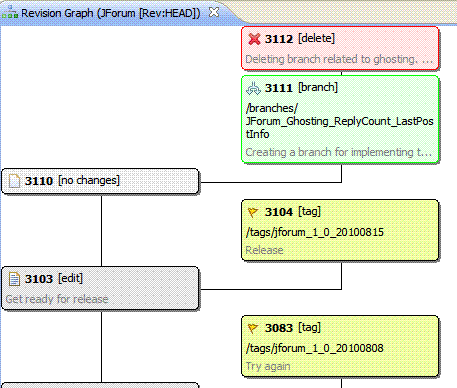
  • Revision Graph optional feature (see screenshot up top).  This was pretty much the only thing I switched to Tortoise SVN for and now it is in my main tool.  It is also easier to use than Tortoise’s version.  It has the following features:
    • Handles tags/branches/etc
    • If you mouseover a box, you see author, date and full commit comment
    • If you right click a box, you can compare to the trunk (which it calls ‘HEAD’ oddly enough), show history or branch/tag from that revision.
    • The image scrolls well.

What is still missing?

It’s still a pain to look at all the changes to a file.  This is something that is easy in CVS, but not SVN.  It is better than it was in the past release, but still a pain.  I recognize this is a number of operations in SVN, but it would be nice if a tool could automate it.  Since none of the other Subversion plugins have this feature either, I can’t call it a fault of Subversive though.

Comparison with Subclipse

In fairness to Subclipse, Subclipse also has an optional revision graph feature at this time.  Most of the logic from my previous post still applies.  I still like Subversive “just a bit better.”

What’s next?

I think the big question is whether Subversive will get promoted to actually be part of Eclipse.  It looks a lot more promising than 18 months ago.

—-

See my review of Eclipse 3.6 itself.