
I’ve been playing with JUnit 5 for a while. Since I’m going to be speaking about it at JavaOne, I decided to write all my tests using JUnit 5 between now and then. Plus we are getting close to JUnit 5’s official release; it’s pretty stable now.
Since it is more than just playing, I wanted my IDE to support it. And my Maven POM needed to know about both JUnit 4 and 5. It wasn’t hard.
Note if you are using IntellIJ, it works out of the box so you just have to set up Maven.
Update Eclipse
I also decided to update my Eclipse so I could run JUnit 5 tests in the workspace. I had to let Eclipse update 3 other plugins to be compatible with the latest version. It was easy to do though and I didn’t need to re-install my custom plugins. In September (or so), Eclipse will release with JUnit 5 support in it.
Update Maven POM
Then I updated my pom to use the dependencies in the JUnit 5 Maven sample. I also added failsafe support and junit-jupiter-params dependency (for parameterized tests which I use a lot)
<project xmlns="http://maven.apache.org/POM/4.0.0" xmlns:xsi="http://www.w3.org/2001/XMLSchema-instance" xsi:schemaLocation="http://maven.apache.org/POM/4.0.0 http://maven.apache.org/xsd/maven-4.0.0.xsd">
  <modelVersion>4.0.0</modelVersion>
  <groupId>GROUP_ID_GOES_HERE</groupId>
  <artifactId>ARTIFACT_ID_GOES_HERE</artifactId>
  <version>0.0.1-SNAPSHOT</version>
  <properties>
    <java.version>1.8</java.version>
    <surefire.version>2.19.1</surefire.version>
    <junit.version>4.12</junit.version>
    <junit.jupiter.version>5.0.0-RC2</junit.jupiter.version>
    <junit.vintage.version>${junit.version}.0-RC2</junit.vintage.version>
    <junit.platform.version>1.0.0-RC2</junit.platform.version>
  </properties>
  <build>
    <plugins>
      <plugin>
        <artifactId>maven-failsafe-plugin</artifactId>
        <version>${surefire.version}</version>
        <executions>
          <execution>
            <goals>
              <goal>integration-test</goal>
              <goal>verify</goal>
            </goals>
          </execution>
        </executions>
        <dependencies>
          <dependency>
            <groupId>org.junit.platform</groupId>
            <artifactId>junit-platform-surefire-provider</artifactId>
            <version>${junit.platform.version}</version>
          </dependency>
        </dependencies>
      </plugin>
      <plugin>
        <artifactId>maven-compiler-plugin</artifactId>
        <version>3.0</version>
        <configuration>
          <source>${java.version}</source>
          <target>${java.version}</target>
        </configuration>
      </plugin>
      <plugin>
        <artifactId>maven-surefire-plugin</artifactId>
        <version>${surefire.version}</version>
        <configuration>
          <includes>
            <include>**/Test*.java</include>
            <include>**/*Test.java</include>
            <include>**/*Tests.java</include>
            <include>**/*TestCase.java</include>
          </includes>
          <properties>
            <!-- <includeTags>fast</includeTags> -->
            <excludeTags>slow</excludeTags>
          </properties>
        </configuration>
        <dependencies>
          <dependency>
            <groupId>org.junit.platform</groupId>
            <artifactId>junit-platform-surefire-provider</artifactId>
            <version>${junit.platform.version}</version>
          </dependency>
        </dependencies>
      </plugin>
    </plugins>
  </build>
  <dependencies>
     <dependency>
       <groupId>org.junit.jupiter</groupId>
       <artifactId>junit-jupiter-api</artifactId>
       <version>${junit.jupiter.version}</version>
       <scope>test</scope>
     </dependency>
     <dependency>
       <groupId>org.junit.jupiter</groupId>
       <artifactId>junit-jupiter-params</artifactId>
       <version>${junit.jupiter.version}</version>
       <scope>test</scope>
     </dependency>
     <dependency>
       <groupId>junit</groupId>
       <artifactId>junit</artifactId>
       <version>${junit.version}</version>
       <scope>test</scope>
     </dependency>
     <dependency>
       <groupId>org.junit.platform</groupId>
       <artifactId>junit-platform-launcher</artifactId>
       <version>${junit.platform.version}</version>
       <scope>test</scope>
     </dependency>
     <dependency>
       <groupId>org.junit.jupiter</groupId>
       <artifactId>junit-jupiter-engine</artifactId>
       <version>${junit.jupiter.version}</version>
       <!-- docs don't have this as test scope; trying anyway to see what happens -->
       <scope>test</scope>
     </dependency>
     <dependency>
       <groupId>org.junit.vintage</groupId>
       <artifactId>junit-vintage-engine</artifactId>
       <version>${junit.vintage.version}</version>
       <!-- docs don't have this as test scope; trying anyway to see what happens -->
       <scope>test</scope>
     </dependency>
     <!-- other dependencies my project needs like selenium go here -->
  </dependencies>
</project>
Problems I encountered (with solutions)
- Maven doesn’t run failsafe tests – Originally I didn’t have failsafe version 2.19.1 because I had copied the pom from the junit sample. And the JUnit sample didn’t have any integration tests so no reason to include failsafe.
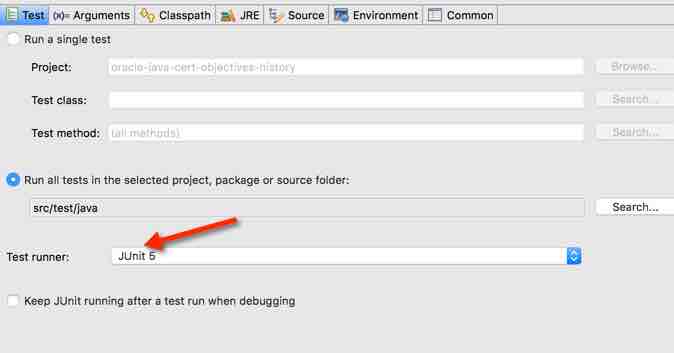
- Eclipse doesn’t recognize migrated JUnit 5 tests – If you’ve ever run JUnit 4 tests against that project/test, Eclipse has a stored configure with the test runner set to JUnit 4. You can go to “run configurations” and either delete the existing configuration or change the runner to JUnit 5 for that configuration. I choose the later:
Remember that with this configuration, you are merely prepared to have JUnit 5 tests in your project. Since JUnit 5 is (mostly) backward compatible, the tests still work as is.