5 Tips to be a Good JDBC Programmer

Have you written Java code for your database connections in JDBC that ends up being thrown away? Would using a new database software easily kill your product and set you back months at a time to port? Well, if so, keep reading as the goal of this article is to make you a better JDBC programmer.

Database

    Tip #1: ALWAYS close connections

I wrote an entry about closing database connections back in July so I won’t belabor the point. Suffice it to say, one of the most common mistakes JDBC programmers make is failing to close database resources like result sets, statements, and connections. Unfortunately, because of the nature of the problem a developer will often never see the error until it is discovered in a production environment since most developers test with one process at a time. In short, every time you open a connection you should close it sometime later and that close should be nearly bullet proof, as so:

Connection con;
try {
   con = ...
} finally {
   try { if(con!=null) {con.close();}}
   catch (Exception e1) {}
}

As mentioned in the post about the subject, you can replace the finally code with a call to a method such as closeConnection() which does the same thing.

    Tip #2: Always use PreparedStatements over regular Statements

As you may be aware, PreparedStatements come with many advantages over regular Statements:

  • Sanitizes your database inputs: Great Example
  • Organizes your statements into set of input/output commands
  • Performance boost: The pre-compiled statement can be reused multiple times

The mistake a lot of programmers make is when they say “Well, I have no inputs to the query, so I’m not going to use PreparedStatements”. First off, they may have inputs down the road they needed to ‘tack on’ to the query, and it will save a lot of time rewriting the code if the query is already structured as a PreparedStatement. Second, perhaps there are some hard-coded input values that you can’t imagine changing, but could change down the road. Better to use a PreparedStatement and a static object, than to hard-code it, as shown in this example:

Statement statement = con.createStatement();
statement.executeQuery("SELECT name FROM widgets WHERE type = 'WidgetB'");

versus:

final String widgetType = "WidgetB";
Statement pStatement = con.prepareStatement("SELECT name FROM widgets WHERE type = ?");
pStatement.setString(1,widgetType);
pStatement.executeQuery();

Sure, the first example is shorter, but the second gives you the freedom to easily change the Widget Type down the road as well as supporting additional inputs since the setup work is all ready done.

    Tip #3: Be Prepared To Change Databases

It’s not a myth; database platforms do change. You may be working on a project using Oracle and you get a request from your manager for an estimate to port the code to MySQL. It can and does happen, the question is are you going to respond with “a couple of days/weeks” or “12-24 months”. Your answer should shed some light on how good your code really is.

    Tip #4: Never Reference Database-Specific Libraries

If you ever find yourself writing a line of code such as this:

OracleCallableStatement cst = (OracleCallableStatement)conn.prepareCall ...

Stop! This is an example where a regular Callable Statement is likely called for, but you’re using a database-specific line in your code. The whole purpose of JDBC driver pattern is that you can drag and drop new JDBC driver libraries for MySQL, Oracle, etc into your application and the software will still compile and run just fine. Lines of code like the one above require you have the JDBC library available at compile-time and guarantee you’ll have to rewrite code to port to another language. In other words, writing a line of code like this is a developer admitting to themselves “I will definitely need to rewrite this line of code if I want to port to another database”.

    Tip #5: Never use Database Stored Procedures*

Never, ever, write a Java application that relies, in large part, on stored procedures. Not only can they never be ported to a different database, 9 times out of 10, you can’t even recall exactly what they did when you wrote them. They fall into the same category of Perl code, which is WORN (write once, read never), since most of the time reading them is harder than rewriting them, mostly because TSQL/PSQL are not very pretty languages to work with.

* There some cases where stored procedures are allowed, such as reporting statistics or materialized views, but these are few and far between. The bulk of your main application logic, such as adding new users, performing basic transactions, and editing data should not rely on stored procedures in any way. Reporting is allowed here because often times performing metrics on millions of records in JDBC would require too many round trips over the network. In other words, reporting requires the kind of direct network access stored procedures guarantee since they run on the database itself. But if you are stuck using them, you should insulate them so they don’t interact with any of your java code directly, such as an independent nightly build of statistics.

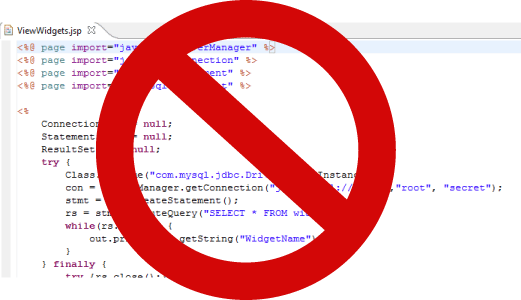
    Bonus Tip #6: Never put JDBC code inside JSPs

I started with 5 tips but our reader’s comments reminded me of a 6th tip: Never put JDBC code of any kind inside a JSP! The purpose of a 3-tiered architecture is to get good separation of layers, and putting JDBC code inside the presentation tier skips the middle layer all together. Some developers reduce the impact of this mistake by putting their connection code inside a Java file and only passing the result set to a JSP. This is still really bad! JSPs should have no JDBC code whatsoever since most of the time queries can be reused by multiple modules and JSPs don’t exactly lend themselves to resusability.


Database Key Generation in Java Applications

All JDBC programmers at one time or another have had to deal with key generation for new records, or more precisely, how to retrieve keys for newly created records. This article discusses some of the techniques and limitations offered to Java JDBC programmers.

Key

  • Unique Keys

Most (good) database systems assign a unique key, usually a large number, to every record in the database. For example, a user “Bob Jones” might have a User Id associated with the record of 808182313713. This key is unique for Bob and is a lot easier to pass around a system then Bob’s full name, since there may be other Bob Jones’s in the system. We could spend time discussing Natural Keys, although I would argue there is no such thing as natural keys. As an example, Bob’s social security number might seem like a natural key since it is unique to Bob but it may be the case Bob is a visiting foreigner (or the application is deployed outside the country) in which a US social security number is not applicable. Also, it’s been reported the government has been known to recycle social security numbers, as well as the fact that people can be issued new social security numbers during their lifetime. Even if unique natural keys did exist – e-mail for example – what if a user wants to change their address down the road?

This leads us to our second requirement of unique keys: Unique keys should not change throughout the life of the system. Changing unique keys is often an extremely difficult, highly risk process. A third, less followed, requirement is that unique keys should be private and only used internally by the application server. This is a huge boon to security and prevents users from attacking the system. In the case the system does need to expose a key, such as an eBay item number found in the URL of the auction, the system may create two keys: an Internal Id that is used for table relations within a database, and an External Id used to perform lookups on behalf of the user. The key here is that the External Id the user sees only exists in one record, whereas the Internal Id is used throughout the system to connect different records.

For the purpose of this article, we’ll assume key generation is the common approach of assigning long integers to each record in a table. In most database systems, this corresponds to the BIGINT type.

Helpful Advice: Always use the largest integer type the database has to offer for unique keys – numeric wrap-around is something to be concerned about, especially on smaller data types.

  • Defining the Problem

Most systems generate keys sequentially starting with a low number such as 1000. Why? Well, for starters it makes it easy to find new unused key value. Just find the max value of the table, and any value above this will be an unused available key. You could randomly generate a key, but then creating a new key would be a time consuming processing of generating a random number that has not been used.

Now, let’s say a user is in the process of creating a new record in your system. For each user record, you also have a set of postal addresses. For example, Bob may be purchasing items on NewEgg and have a home address and a work address. Furthermore, Bob enters his two addresses at the time he creates his account, so the application server receives the information to create all 3 records at once. In such a situation, you would normally have 3 records: 1 user record for Bob and 2 address records. You could add the address info in the user table, although then you have to restrict the number of addresses Bob can have and/or have a user table with a lot of extra columns.

Inserting Bob into the user table is straight forward enough, but there is a problem when you go to insert users into the address table, namely that you need Bob’s newly generated User Id in order to insert any records into the address table. After all, you can’t insert addresses without being connected to a specific user, lest chaos ensue in your data management system.

Most database systems provide a technique for the database to create keys for you in the event you do not specify them. In this situation, the first insert would leave the User Id for Bob as blank, or more precisely null, and the database would fill in a new value on insertion. The problem is the database isn’t really obligated to tell you what this newly created value is. The rest of this article will be devoted to discussing how you can get this generated key in your application.

  • Technique 1: Get the max id

Probably the most common approach is the quick and dirty one; perform a select query immediately after your insert and retrieve the max value:

SELECT max(id) FROM users

The good: In a lot of systems this actually works pretty well. It’s easy to implement and is extremely database independent.
The bad: It’s extremely risky in high concurrency environments. For example, if two users perform inserts at nearly the same time, they will both get the same max value from this query, leading to a huge breach in security (both users may have access to one of the users records if the application server returns the same id). There are ways to set your transaction isolation level to avoid problems like this, but that can be tricky and often requires more skill and experience than someone implementing this solution regularly is likely to have.

Also, you have to be *very* sure the system always creates keys strictly in ascending order. A database system that reused old or skipped key values would be incompatible with this approach.

  • Technique 2: JDBC to the Rescue!

Many JDBC programmers are unaware that there is built-in JDBC method for retrieving the newly generated keys immediately after an insert. It is appropriately named getGeneratedKeys() and can be used as follows:

Connection con = // connect to database
final PreparedStatement ps = con.prepareStatement("INSERT INTO users (...) VALUES (...)");
ps.setInt(1,...)
...
final int insertStatus = ps.executeUpdate();
int newKey = -1;
if(insertStatus == 1) {
     final ResultSet rs = ps.getGeneratedKeys();
     if(rs.next()) {
          newKey = rs.getInt(1);
          if(rs.next()) {
               // Probably should throw some exception if rs returns a second, unexpected record
          }
     } else {
          // Probably should throw some exception if no generated keys created
     }
} else {
     // Definitely should throw an error if insert failed
}
System.out.println("The key value for the newly created record is: "+newKey);

A reminder: JDBC starts with 1 (instead of 0) for accessing columns based on an index number.

The good: Don’t need to write any special or tricky logic to get the key. Works in systems that use ascending and non-ascending key value generation. No risk of getting the wrong key value even if you fail to set transaction or isolation levels properly.
The bad: Not supported by all JDBC drivers. Need to test it out in your real system to verify it works before relying on it.

  • Technique 3: Application Server Controlled Keys

One approach used in most large J2EE systems is to build a key generation service within the application tier. In this manner, all generated keys are created ahead of time by the application server without the use of any database-specific features. In the example above, the system would generate all the keys for the user and addresses before the first insert even occurs. Then it would insert the 3 records, one after another, using the keys it had at the start of the service. Keep in mind, the order of insert still matters, i.e. you can’t insert an address for a user that does not yet exist; but in this case, you don’t need to stop after the first insert to figure out information for the next insert.

Such a key generation module would have to be application-wide (static) and thread safe to prevent two requests from getting the same key at the same time. Also, such a system would have to be fault tolerant; if the system crashes it should not reassign any of the same keys after the next restart.

Often this is implemented with a database table that keeps track of the most recently assigned key for each record. To make the service perform well, keys are often released in blocks. For example, the system might say “The last key used was 4100, and I’m going to request 4101-4200”. In this manner the system would update the database record for that table to 4200 and only change this value when it used up all 100 keys in memory. It’s fault tolerant because even if not all keys from 4101-4200 are used, if the system crashes, it knows it can just request 4201-4300 next time.

The good: Performs better than any of the other solutions since it takes the load off of the database entirely. All inserts can be performed immediately without requesting information from the database in between inserts. Safer than any of the solutions because its is 100% database independent. Supports composite keys and distributed database systems.
The bad: Requires the most overhead of any of the solutions since you need to implement a server wide key generation tool. Requires the application server to know the name of each table (or some reference to each table) to track the key generation values for each table. Also, you could skip a lot of keys (sparse key range) if your system restarts frequently, although servers shouldn’t be restarting frequently! Lastly, it tends to require an experienced developer to implement properly (prevent errors) and perform well (using blocking properly).

  • Technique 4: Database-specific techniques

Lastly, you may want to rely on database-specific techniques. For example, Oracle allows you to write queries such as:

INSERT INTO Users (...) VALUES (...) RETURNING (id) INTO newUserId

In this case you would perform an executeQuery() instead of an executeUpdate(), so that the results of the insert could be read in a Result Set.

There are numerous other database-specific techniques for retrieving newly generated keys, but since I advocate against database-specific code in Java applications, I’ll leave a more detailed discussion for someone else.

The good: It’s safer than technique 1 since it works in systems with non-sequential keys.
The bad: It’s database-specific. Not only that but as shown above, all of your insert statements would be database specific. Would make moving the code to another database system very difficult (often impossible).

  • Final Thoughts

Generally, for smaller systems Technique #2 using getGeneratedKeys() is the best solution. Larger systems with composite key generation or distributed databases often require Technique #3 for an application controlled key generator.

As for the other two approaches, I would strongly advise against ever using Technique #4, lest you want to give future developers of your source code a huge headache in management and portability. Lastly, Technique #1 is sometimes safe to use, especially in single threaded systems, although is often evidence of a beginner JDBC developer.

Error Checking Across Three-tiered Systems

For today’s post we’re going to delve into one of the least talked about but extremely common tasks a software developer works with, input validation, or error checking as its more commonly referred to as. Input validation is defined as taking what a user enters on screen, verifying it meets certain requirements, and returning a message to the user if it fails validation.

Let’s say you have a web page that requires a user to enter their zip code as part of account creation. What are the possible paths the user might take? Let’s list them:

  • Success: The user enters a 5-digit zip code
  • Error #1: The user leaves the zip code blank
  • Error #2: The user enters a non-number, such as “Hello”
  • Error #3: The user enters a zip code that has less than 5 digits such as “93”
  • Error #4: The user enters a zip code that has greater than 5 digits such as “9319299”
  • Error #5: The user enters a non-existent zip code such as “00000”

Let’s further add the conditions that the application has been developed using the common three tiered architecture pattern with a web-based HTML UI, a java-based application server, and a SQL-based database server.

The first question to ask is, what needs to be validated on which levels?

  • Top Tier: User Interface Validation

Stepping away from zip code for a second, let’s say you want to know the user’s birthday. You could ask them to enter it as a text field such as “10/11/1970” or, more commonly, ask them to use drop down menus to select the month, the day, and the year. The first type of input, where you give the user a lot of control such as a text field is referred to as unstructured input. The second type of input, where you bound the user’s choices to a fixed number of inputs is referred to as structured input. It should go without saying that structured input is far easier for a developer to work with than unstructured since the ‘number of places things can go wrong’ is significantly reduced.

Turning back to the zip code example, a structured input version might have a drop-down of every zip code in the country. That would certainly limit users from entering bad data and reduce most the errors above, but there are nearly 43,000 zip code in the US! The drop-down box would be hard to navigate, not to mention the bandwidth costs of sending every user the list.

For zip code input, we are stuck with unstructured input, but there are ways to reduce the chaotic nature of the input. For example, we could set an HTML width of 5 characters preventing the user from entering more than 5 digits, thereby preventing Error #4 all together.

For Errors #1, #2, and #3, we could use JavaScript to validate the input without every connecting to the application server. If we have extra time we should certainly implement this validation in JavaScript given obvious reduction in server load this would add. Unfortunately, web browsers are not well controlled parts of software systems and users have the freedom to turn JavaScript off. Therefore, no matter how good the front-tier validation is, its really only icing on the cake to improve performance and usability, the ‘meat’ of the validation belongs to the middle tier.

  • Middle Tier: Server side validation

As discussed, unless you have 100% control of a front-end application, which I can argue you never have, things can always reach the middle tier application server that are invalid. For example, a user could be connecting via a web service or by typing in URLs in a browser window. In both of these cases there is no front end to validate the user’s input. Therefore, the primary job of the application server is to provide services that handle all data input from clients and properly store this information in the database.

It is inferred by this logic, then, that the applications server needs someway of reporting errors to the its user. For example, if the zip code is entered incorrectly and discovered on the middle tier, the application server should send a nice, clean message to the user reporting the problem. When a developer forgets to handle this properly, you end up with web pages with ugly stack traces that I’m sure most of you have seen from time to time. In those instances, the developer forgot to properly encapsulate an error message with a user friendly one. It’s a good practice to put a large ‘catch-all’ around each application server entry point, so that in the event the developer missed taking care of an error, the user sees a generic ‘General System Error’ message. While generic messages such as this may not help the user out, it is far better than having them see a huge stack trace on the screen, which may give them private knowledge of the system such as source code paths and method names.

You may have noticed I skipped validating Error #5 on the UI tier, and with good reason. Although zip codes in the US may be 5 digits long, not all 5 digit long numbers are zip codes (logic 101)! For example, ‘00000’ is not a zip code in any state. In order to validate Error #5, you need a database table listing all possible zip codes to check again. Clearly, this is something that should not be done on the UI side since it would require the download of a long list of zip codes. A further validation might be to take the city and state a user enters and verify they belong to a particular zip code. The problem with such excessive validation is that if you’re database less than 100% accurate, the users may have issues in which a valid zip code is declared invalid, or a false positive to use testing terminology.

  • Bottom Tier: Database validation

The final validation is the place where the data ultimately ends up: the database. It is most often accomplish in the form of structured fields or uniqueness constraints. Regardless of whether the input is validated on the front or middle tier, the database ultimately owns the data and its rules cannot be violated.

If the database is so powerful, why not just do all input validation within the database? In the past, people have tried and the short answer is, performance suffers and it is difficult to maintain. For example, you shouldn’t need to go down all 3 tiers to check that zip code is a number; that sort of thing can be easily validated on the first two tiers. You do, on the other hand, need to go down all three tiers to check if a username is unique since it requires the knowledge from the databases to validate. That doesn’t mean you should just insert a user and wait for the database to fail, you should always check for possible errors ahead of time and catch them gracefully before moving on to the next level.

There are times, though, where the database validation is going to throw errors the other two layers cannot possibly check. For example, let’s say two users try to insert a a record at the same time with the same username ‘MrWidget’ and this field is declared UNIQUE in the database. Both users checked ahead of time to see if ‘MrWidget’ was available, found that the username was free, and committed to creating accounts with username ‘MrWidget’. Unfortunately, only one of these users will get name ‘MrWidget’, the other will get an error message. These race conditions are not very common in most systems, but are something your system should be designed to detect and handle when they do happen. A correct solution here would be to allow the user that submitted first to proceed and display a friendly error message to the second user alerting them the name is no longer available. This is also a good example of where a generic system exception is not going to help the user correct their situation since the username.

  • Final Thoughts

We’ve talked a lot about ‘where’ validation needs to take place but not necessarily ‘how’ we should implement it. For large enough systems, there is often a common validation package or method for each type of form submission that verifies the data both on the UI and middletier server. Database validation happens automatically, but recall in mind its better to avoid throwing SQL exceptions ahead of time if you can detect them. Some more advantages approaches, such as Struts, allow you to define basic validation rules in XML file then can then be used to generate Java form submission validation as well as JavaScript validation automatically. Keep in mind though, more advanced validation like checking to make sure a username exists cannot be accomplished with even these advanced validation techniques and always require a trip down all three tiers. The purpose of validation is to protect the system, but validation should always be implemented in a way that helps and supports the performance of the system.