Update (11/05/2020): Read The 1Z0-819 Exam page to learn how you can easily our Java 11 Study Guides to prepare for Oracle’s 1Z0-819 Exam, as well as the 1Z0-817 Upgrade Exam.
If you are taking the Java 8 exam, see the Java 8 version of this post instead.
While it is certainly possible to get all the JDBC questions on the exam correct without running any code or understanding any SQL, it is nice to be able to follow along. This blog post is meant to help anyone who has purchased our book, OCP: Oracle Certified Professional Java SE 11 Programmer II Study Guide: Exam 1Z0-816, download and run through the examples in the text. It also includes the database installation instructions and setup code so you can simply copy/paste it. The actual book covers what you need to know for the exam.
This blog post assumes you are reading chapter 10 of our OCP 11 book for 816 exam and have gotten up to the part that references this blog post.
Download Derby
Option 1: Download the derby.jar from Maven Central
Option 2: Apache Derby is an open source database. It is really easy to install and use. To install:
- Go to the Derby download page
- Click on the link for the latest version. (At the time of this blog post, that was 10.15.1.3)
- Download the zip file and unzip it. This will create a folder named something like db-derby-10.15.1.3-bin. The unzipped contents will look like this:
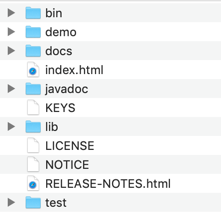
In the lib directory, copy the derby.jar to a convenient location on your machine.
Creating your initial database
To start out, copy this code into a file named SetupDerbyDatabase.java.
import java.sql.*;

public class SetupDerbyDatabase {

    public static void main(String[] args) throws Exception {
        String url = "jdbc:derby:zoo;create=true";
        try (Connection conn = DriverManager.getConnection(url)) {

            // run(conn,"DROP TABLE names");
            // run(conn,"DROP TABLE exhibits");

            run(conn,"CREATE TABLE exhibits ("
                    + "id INTEGER PRIMARY KEY, "
                    + "name VARCHAR(255), "
                    + "num_acres DECIMAL(4,1))");

            run(conn,"CREATE TABLE names ("
                    + "id INTEGER PRIMARY KEY, "
                    + "species_id integer REFERENCES exhibits (id), "
                    + "name VARCHAR(255))");

            run(conn,"INSERT INTO exhibits VALUES (1, 'African Elephant', 7.5)");
            run(conn,"INSERT INTO exhibits VALUES (2, 'Zebra', 1.2)");

            run(conn,"INSERT INTO names VALUES (1, 1, 'Elsa')");
            run(conn,"INSERT INTO names VALUES (2, 2, 'Zelda')");
            run(conn,"INSERT INTO names VALUES (3, 1, 'Ester')");
            run(conn,"INSERT INTO names VALUES (4, 1, 'Eddie')");
            run(conn,"INSERT INTO names VALUES (5, 2, 'Zoe')");

            printCount(conn,"SELECT count(*) FROM names");
        }
    }

    private static void run(Connection conn, String sql) throws SQLException {
        try (PreparedStatement ps = conn.prepareStatement(sql)) {
            ps.executeUpdate();
        }
    }

    private static void printCount(Connection conn, String sql) throws SQLException {
        try (PreparedStatement ps = conn.prepareStatement(sql)) {
            ResultSet rs = ps.executeQuery();
            rs.next();
            System.out.println(rs.getInt(1));
        }
    }
}
To run the program, you need to include the Derby jar file in your classpath. If you don’t know how to find it or encounter problems see the below frequently asked questions in this blog post.
For example:
java -cp "<pathToDerby>/derby.jar" SetupDerbyDatabase.java
If all goes well, the program will output the number 5.
Note that we used single file source code execution here. This simplified the classpath since we only needed to specify the derby jar. Had we compiled our class we would have needed to include it as well (along with an operating system delimiter)
Alternatively, you could have added Derby to your CLASSPATH environment variable and just run the program as
java SetupDerbyDatabase.java
What does this program actually do?
The main method starts out by obtaining a connection to the Derby database. It then calls a run method to actually run the SQL. The run method uses a PreparedStatement with all the data hardcoded.
The code runs two SQL statements to create tables in the zoo database. The commands each include:
- the table name – exhibits and names
- the fields in each table along with their type. Integer is like a Java int. Decimal is like a Java double. Varchar stands for variable character and is like a String. The variable length part means that the database doesn’t need to allocate space for all 255 characters and should only use the space for the actual length of the string. (This matters when you frequently update the field with values of different lengths)
- the primary key for each table – this tells the database how to you uniquely identify each row
Then the code runs seven SQL statements to insert rows into these tables. The order of the data columns matches the order the fields were defined in the create statements.
Finally, the code runs a query to check the rows were added to the database. The count(*) function in SQL always returns a number. For an empty table, this number is zero. Therefore, we can call rs.next() outside of a conditional or loop. We know there is always a number being returned.
Derby will create a “zoo” directory and a derby.log file in whatever directory you ran the program in. The zoo directory is your database.
Frequently Encountered Problems
If you have an error that isn’t here or have trouble with these instructions, feel free to ask a question in the CodeRanch forums
ERROR #1 – DERBY IS NOT IN YOUR CLASSPATH OR POINTS TO AN INVALID LOCATION
Exact error message:
Exception in thread "main" java.sql.SQLException: No suitable driver found for jdbc:derby:zoo;create=true
	at java.sql/java.sql.DriverManager.getConnection(DriverManager.java:702)
	at java.sql/java.sql.DriverManager.getConnection(DriverManager.java:251)
	at SetupDerbyDatabase.main(SetupDerbyDatabase.java:7)
Solution:
Check you are actually pointing to Derby in your classpath. Also check your classpath has the three required components
ERROR #2 – THE TABLES ALREADY EXIST
Exact error message:
Exception in thread "main" java.sql.SQLException: Table/View 'EXHIBITS' already exists in Schema 'APP'.
	at org.apache.derby.impl.jdbc.SQLExceptionFactory.getSQLException(SQLExceptionFactory.java:115)
...
Solution:
The program can only be run once as is. If you want to run it again, uncomment the two “drop table” lines.
Error #3 – NoClassDefFoundError: SystemPermission
Exception in thread "main" java.lang.NoClassDefFoundError: org/apache/derby/shared/common/security/SystemPermission
	at org.apache.derby.iapi.jdbc.AutoloadedDriver.connect(AutoloadedDriver.java:134)
	at java.sql/java.sql.DriverManager.getConnection(DriverManager.java:677)
	at java.sql/java.sql.DriverManager.getConnection(DriverManager.java:251)
	at injection.AttackStatement.main(AttackStatement.java:12)
Caused by: java.lang.ClassNotFoundException: org.apache.derby.shared.common.security.SystemPermission
	at java.base/jdk.internal.loader.BuiltinClassLoader.loadClass(BuiltinClassLoader.java:583)
	at java.base/jdk.internal.loader.ClassLoaders$AppClassLoader.loadClass(ClassLoaders.java:178)
	at java.base/java.lang.ClassLoader.loadClass(ClassLoader.java:521)
If you are using an IDE that uses the module path instead of the classpath, add derbyshared.jar to your module path in addition to derby.jar. (This jar is needed when running with modules.)
Note: While the exam does have topics on modules, they are distinction questions. We recommend using the classpath (and command line) when studying all topics other than the Java Platform Module System.