
I had written up how to interpret the % Pathways give you to know how far your member are. This changed in September 2019 now what members can do projects in any order.
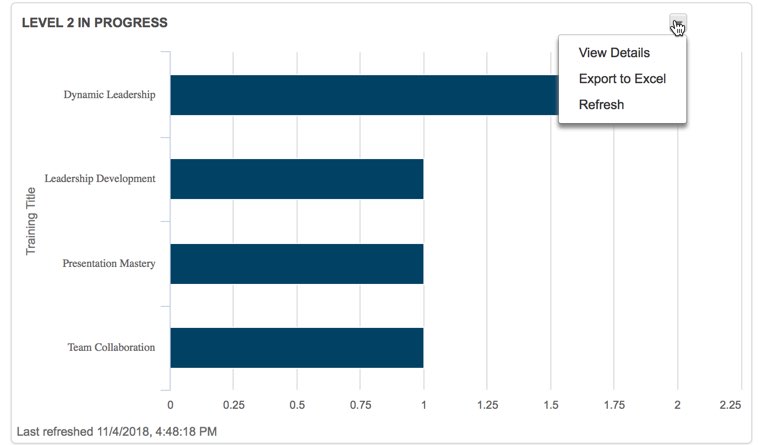
In Pathways, three Toastmasters officers are able to access Base Camp Manager. They can view individual progress. For example, this bar chart shows how many members my club has currently working on level 2. (If you don’t see anything in your bar chart, refresh.)
You can click the little arrow and view details (in a browser) or export to Excel to see which members are on which paths. You can now see which projects they have started (In Progress status) or finished (Completed status)
Additionally, on the second tab of reports, you can look at the path progress report and export a %. When you log in as a member, you see two percentages:
- The percentage complete within a level.
- The percentage complete within a path (aka across all six levels) – This is the % that shows up in the report base camp manager shows.
What’s this about six levels?
Pathways now has six levels. The five you are accustomed to plus the “Path Completion” level.
What do the percentages mean? (If you don’t like math, skip to the table at the end)
Ok, so what does this mean? Each of the six levels is worth a sixth of 100%. That’s 16.66667%. Each level has a certain number of projects. The 16.66667% is equally distributed across those projects.
Let’s start with a simple example. Suppose a member has gone in order and completed all of levels 1 and 2. That member has completed 33.333333% of Pathways which rounds to 13%
Now, suppose a member has completed the Icebreaker and Evaluation/Feedback projects in level 1. This member has two projects remaining in level 1 (Research/Presenting and Level Completion.) That means the member has credit for half of level 1 which is 8.333333%. Toastmasters appears to round up giving us a status of 9%.
But what if members don’t go in order
Now suppose a member completed the Icebreaker and Evaluation/Feedback projects in level 1 *and* the Understanding your Leadership Style in level 2. This member will get the same 8.33333% from level 1 as in the previous example. The member will get an additional 4.16667% for the level two project. Bringing the member to 13%.
For members who go in order (no math)
Note that percentages in italics are ones that I derived mathematically but haven’t yet seen in practice.
| Percentage | What it means |
|---|---|
| 0% | Signed up for a path, but didn’t do the icebreaker yet |
| 5% | Completed the icebreaker |
| 9% | Completed two projects in level 1 |
| 13% | Completed all the projects in level 1 but needs to submit the level completion (or have it approved) |
| 17% | Completed level 1, but hasn’t yet done any projects in level 2 |
| 21% | Completed one level 2 project |
| 25% | Completed two level 2 projects |
| 29% | Completed all level 2 projects but needs to submit the level completion (or have it approved) |
| 33% | Completed level 2, but hasn’t yet done any projects in level 3 |
| 37% | Completed one level 3 project |
| 41% | Completed two level 3 projects |
| 45% | Completed all level 3 projects but needs to submit the level completion (or have it approved) |
| 50% | Completed level 3, but hasn’t yet done any projects in level 4 |
| 56% | Completed one level 4 project |
| 61% | Completed all level 4 projects but needs to submit the level completion (or have it approved) |
| 67% | Completed level 4, but hasn’t yet done any projects in level 5 |
| 73% | Completed one level 5 project |
| 78% | Completed all level 5 projects but needs to submit the level completion (or have it approved) |
| 83% | Completed level 5 |
| 92% | Completed Reflect on Your Path, but needs to submit level completion |
| 100% | Path completed |
For members who don’t go in order (a little math)
- For each level the member completed, add 16.67%
- For each project in a non completed level, add the number for that level from this list
- Level 1: add 4%
- Level 2: add 4%
- Level 3: add 4%
- Level 4: add 5.5%
- Level 5: add 5.5%
- Level 6: add 8.5%
- Round up
Finally, thank you to Toastmasters phone support for letting me know the percentage was changed to accommodate out of order and the 16.67%. That gave me enough to figure out the rest.