ant and junit 5

Ant now supports JUnit 5. The CodeRanch software uses Ant (because internet connections vary around the world). This blog post describes how I upgraded.

What isn’t supported

While doing this, I learned that not everything supported in JUnit 4 for Ant is currently supported with JUnit5. In particular:

Preparing my environment

Updating Jars for Ant

Ant’s JUnitLauncher page gives a list of the required jars. I decided to download them directly from a Maven repository rather than using the copies in my local repository so I have the latest ones. I grabbed the jars needed for both JUnit 4 and 5 so I could test transitioning.

  • junit-platform-commons.jar
  • junit-platform-engine.jar
  • junit-platform-launcher.jar
  • opentest4j.jar
  • junit-vintage-engine.jar
  • junit-jupiter-api.jar
  • junit-jupiter-engine.jar
  • junit-jupiter-params.jar (I do a lot of junit parameterized testing)
  • apiguardian-api (dependency for junit parameterized testing)
  • junit.jar (use legacy junit jar for migration)
  • hamcrest-all.jar (not sure why needed now and not before)

I copied all these jars to the lib directory of my Ant install. If you forgot to do this before the next step, update the Eclipse preferences again now. Otherwise, you will get this message when running a build.

java.lang.NoClassDefFoundError: org/junit/platform/launcher/core/LauncherFactory

Switch Eclipse to the JUnit 5 runner but run JUnit 4 tests

This is easy.

  • Updated Eclipse preferences to point to it (Ant > Runtime – Ant Home)
  • Add the JUnit 5 library to your project’s classpath
  • Run > Run Configurations
  • Select the launch config for your test runner(s)
  • Change the test runner pull down to select JUnit 5
  • Observe the tests still pass

Switch Ant to the JUnit 5 runner but run JUnit 4 tests

Unlike Eclipse, this is not easy.

Updated Ant file

    • removed JaCoco wrapper for JUnit Ant task (was using this to give Sonar the test coverage – need to investigate the replacement)
    • removed code for setting custom system property – replaced with code described in setting System Property blog post
    • replaced the <junit> tags with <junitlauncher> tags
    • removed the attributes that are not supported by the new tag: showoutput=”no” fork=”yes” forkmode=”once”
    • changed printsummary attribute value from “yes” to “true”
    • replace batchtest tag with testclasses tag and change attribute to outputdir
    • switch formatter tag to listener tag using new attributes
    • added to nested classpath in junitlauncher task <pathelement location=”${junit.jars.dir}”/>
    • changed fileset to use .class instead of .java in matching
    • removed code to pass in all existing system properties. (since JUnit being run in the same VM, this is no longer necessary)
      <!-- Pass along all the system properties to the junit task -->
      <syspropertyset>
        <propertyref builtin="all"/>
        </syspropertyset>
      

Actually migrating the code to JUnit 5

While JUnit 5 can run JUnit 5 tests, I decided to migrate them all.

  1. Migrate core assertions/imports
    1. Ran the program I wrote to migrate most of the pieces.

Migrating the unit tests

  1. Created launch configurations to replace old runners
    1. Removed “all test runner”. Can do this in modern IDEs without the old Classpath Suite
    2. Right clicked Eclipse project and choose run as junit test. Saved this as my new JUnit 5 launch config favorite so can run all tests in one click.
    3. Repeated right clicking /src/test/java (we have separate folders for unit and integration tests) to create a launch config for only unit tests). I should change this to the Maven naming convention of IT
  2. Migrated Mockito code (we had about 50 affected classes in JForum)
    1. In Eclipse project, did search for @RunWith(MockitoJUnitRunner.class) and @RunWith(MockitoJUnitRunner.Silent.class)
    2. Right click in search view > Replace All
    3. Replace with: @ExtendWith(MockitoExtension.class)
    4. Right click project > Source > Organize imports
  3. Migrated parameterized tests by hand (we only had 1)
  4. Migrated the one test with a timeout by hand
  5. Removed a custom assertArrayEquals() method we had written (presumably before JUnit had it). The migration program changed the order of parameters in the method call, but not the custom method so it didn’t compile.
  6. Changed one assertThat manually. It was using a matcher in an odd way.
  7. Now that the code compiles, ran the unit tests. 43/2416 failed.
  8. We were missing a setup call to load a property file in a commonly used superclass. (This appeared to work before due to a different order of test runs). Fixing that one test brought it to 19 failures.
  9. The remembered I forgot to migrated tests that used (expected=MyException.class) to use the new assertions – found these by searching for FIXME). That was the rest.
  10. Finally, I had two tests that relied on special encoding which the converter program broke. I rolled back these parts manually.

Migrating the integration tests

  1. We add a JUnit Runner for all our functional test. It loaded an in memory database (or real database depending on your configuration). I migrated this to an extension. The code is a lot clearer as an extension which is nice.
  2. Then I search/replaced @RunWith(JavaRanchFunctionalTestRunner.class) with @ExtendWith(CodeRanchFunctionalTestExtension.class) and did an organized imports on the folder for the functional tests.

Removing JUnit 4

After migrating, I removed JUnit 4 and the vintage engine from:

  • Eclipse project classpath
  • Jar file in project
  • Ant install’s lib directory


good security – warnings in project

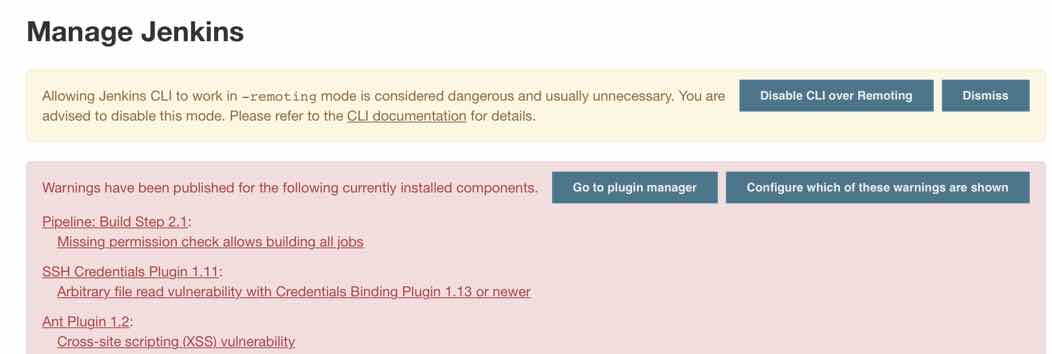
Cloudbees puts out security alerts frequently for Jenkins. We didn’t patch at CodeRanch for a while and then it got overwhelming. I wanted to get the latest JUnit plugin today. After upgrading to the latest Jenkins core, I went to manage Jenkins and saw this.

I was pleased. The product itself reminded me that we should check our security settings. It also reminded of all the security alerts that we missed.

We are now up to date (as of this moment) and it took less than hour. If I wasn’t counting the Jenkins core install and test, it would have been even less.


ant and junit 5 – outputting test duration and failure to the log

In JUnit 5, you use the junitlauncher Ant task rather than the junit Ant task. Unfortunately, this isn’t a drop in replacement. In addition to needing a workaround to set system properties, you also need a workaround to write the test results to the console log.

JUnit 4

With JUnit 4 and Ant, you got output that looked list this for each test run. In the console. Real time while the build was running. This was really useful.

[junit] Running com.javaranch.jforum.MissingHeadTagTest
[junit] Tests run: 1, Failures: 0, Errors: 0, Skipped: 0, Time elapsed: 1.685 sec

The problem

JUnit 5 itself provides a number of built in options for this. However, Ant integration renders this “not very useful” for a few reasons.

    1. I want to use the legacy listeners. For example:
      <listener type="legacy-xml" sendSysOut="true" sendSysErr="true" />
      <listener type="legacy-plain"sendSysOut="true"sendSysErr="true"/>


      However, if I enabled sendSysOut and sendSysErr to them, all the listeners present redirect away from System.out. This means if I try to use the built it LoggingListener, it also redirects to the file and I don’t see it in the console. This means, I have to chose between the legacy listeners and seeing real time data.

    2. Ant seems to pass a fileset as individual tests. This means that running this code, prints a summary for each test rather than the whole thing at the end.
      <junitlauncher haltOnFailure="true" printsummary="true">
           <classpath refid="test.classpath" />
           <testclasses outputdir="build/test-report">
      	<fileset dir="build/test">
      	  <include name="**/*Tests.class" />
              </fileset>
      </junitlauncher>
      

      It looks like this. The summary tells me about each run, but not with the test names so not useful anyway.

      [junitlauncher] Test run finished after 117 ms
      [junitlauncher] [         3 containers found      ]
      [junitlauncher] [         0 containers skipped    ]
      [junitlauncher] [         3 containers started    ]
      [junitlauncher] [         0 containers aborted    ]
      [junitlauncher] [         3 containers successful ]
      [junitlauncher] [         0 containers failed     ]
      [junitlauncher] [        15 tests found           ]
      [junitlauncher] [         0 tests skipped         ]
      [junitlauncher] [        15 tests started         ]
      [junitlauncher] [         0 tests aborted         ]
      [junitlauncher] [        15 tests successful      ]
      [junitlauncher] [         0 tests failed          ]
      [junitlauncher] Test run finished after 14 ms
      [junitlauncher] [         2 containers found      ]
      [junitlauncher] [         0 containers skipped    ]
      [junitlauncher] [         2 containers started    ]
      [junitlauncher] [         0 containers aborted    ]
      [junitlauncher] [         2 containers successful ]
      [junitlauncher] [         0 containers failed     ]
      [junitlauncher] [        10 tests found           ]
      [junitlauncher] [         0 tests skipped         ]
      [junitlauncher] [        10 tests started         ]
      [junitlauncher] [         0 tests aborted         ]
      [junitlauncher] [        10 tests successful      ]
      [junitlauncher] [         0 tests failed          ]
    3. If I use JUnit Launcher’s fail on error property, it fails on the first test rather than telling me about all of them. (I don’t use this feature anyway.)
    4. Custom extensions also have their system out/err redirected to the legacy listeners.

The solution

This feels like a hacky workaround. But I only have one project that uses Ant so I don’t have to worry about duplicate code. The legacy listeners are useful so I don’t want to get rid of them.

I wrote a custom listener that stores the results in memory for each test and writes it to disk after each test class runs. That way it gets all the data, not just the last one. And then Ant writes it out.

<target name="test.junit.launcher" depends="compile">
		<junitlauncher haltOnFailure="false" printsummary="false">
			<classpath refid="test.classpath" />
			<testclasses outputdir="build/test-report">
				<fileset dir="build/test">
					<include name="**/*Tests.class" />
				</fileset>
				<listener type="legacy-xml" sendSysOut="true" sendSysErr="true" />
				<listener type="legacy-plain" sendSysOut="true" sendSysErr="true" />
				<listener classname="com.example.project.CodeRanchListener" />
			</testclasses>
		</junitlauncher>
		<loadfile property="summary" srcFile="build/status-as-tests-run.txt" />
		        <echo>${summary}</echo>
	</target>

And the listener

package com.example.project;

import java.io.*;
import java.time.*;

import org.junit.platform.engine.*;
import org.junit.platform.engine.TestDescriptor.*;
import org.junit.platform.engine.TestExecutionResult.*;
import org.junit.platform.launcher.*;

public class MyListener implements TestExecutionListener {
	
	private StringWriter inMemoryWriter = new StringWriter();

	private int numSkippedInCurrentClass;
	private int numAbortedInCurrentClass;
	private int numSucceededInCurrentClass;
	private int numFailedInCurrentClass;
	private Instant startCurrentClass;

	private void resetCountsForNewClass() {
		numSkippedInCurrentClass = 0;
		numAbortedInCurrentClass = 0;
		numSucceededInCurrentClass = 0;
		numFailedInCurrentClass = 0;
		startCurrentClass = Instant.now();
	}

	@Override
	public void executionStarted(TestIdentifier testIdentifier) {
		if ("[engine:junit-jupiter]".equals(testIdentifier.getParentId().orElse(""))) {
			println("Ran " + testIdentifier.getLegacyReportingName());
			resetCountsForNewClass();
		}
	}

	@Override
	public void executionSkipped(TestIdentifier testIdentifier, String reason) {
		numSkippedInCurrentClass++;
	}

	@Override
	public void executionFinished(TestIdentifier testIdentifier, TestExecutionResult testExecutionResult) {
		if ("[engine:junit-jupiter]".equals(testIdentifier.getParentId().orElse(""))) {
			int totalTestsInClass = numSucceededInCurrentClass + numAbortedInCurrentClass
					+ numFailedInCurrentClass + numSkippedInCurrentClass;
			Duration duration = Duration.between(startCurrentClass, Instant.now());
			double numSeconds = duration.getNano() / (double) 1_000_000_000;
			String output = String.format("Tests run: %d, Failures: %d, Aborted: %d, Skipped: %d, Time elapsed: %f sec",
					totalTestsInClass, numFailedInCurrentClass, numAbortedInCurrentClass,
					numSkippedInCurrentClass, numSeconds);
			println(output);

		}
		// don't count containers since looking for legacy JUnit 4 counting style
		if (testIdentifier.getType() == Type.TEST) {
			if (testExecutionResult.getStatus() == Status.SUCCESSFUL) {
				numSucceededInCurrentClass++;
			} else if (testExecutionResult.getStatus() == Status.ABORTED) {
				println("  ABORTED: " + testIdentifier.getDisplayName());
				numAbortedInCurrentClass++;
			} else if (testExecutionResult.getStatus() == Status.FAILED) {
				println("  FAILED: " + testIdentifier.getDisplayName());
				numFailedInCurrentClass++;
			}
		}
	}
	
	private void println(String str) {
		inMemoryWriter.write(str + "\n");
	}
	
	/*
	 * Append to file on disk since listener can't write to System.out (becuase legacy listeners enabled)
	 */
	private void flushToDisk() {
		try (FileWriter writer = new FileWriter("build/status-as-tests-run.txt", true)) {
			writer.write(inMemoryWriter.toString());
		} catch (IOException e) {
			throw new UncheckedIOException(e);
		}
	}

	@Override
	public void testPlanExecutionFinished(TestPlan testPlan) {
		flushToDisk();
	}
}