
more techniques for making agile games remote friendly

Two years ago, I blogged on how make agile games friendly to remote/distributed teams, Last week, I went to a NYC Scrum User Group meeting and was inspired to repeat the exercise.

This time, I’m going through *how* you think about adapting games as well. The key is to identify the lessons the game is teaching and what makes it run.

Game 1: 60 steps in 60 seconds

Key lesson: the importance of self organized teams.

Description of in person game: The group is split into pairs. The “manager” of one pair gives the “worker” instructions – left/right/stop/go. They do this for a minute and count steps. It’s hard because there are lots of people walking around and the worker has no autonomy. Then the pairs repeat the exercise where the manager can give goals rather than literal steps.

My take: I’ve played this before. In fact, it was the first agile game we played when my team was new to Scrum and needed to see the importance of being self empowered.

Making it remote/distributed friendly: This one is hard. I used a similar idea with a puzzle. I made two puzzles and had people pair up to do them using the same technique as 60 steps in 60 seconds. In one, do exactly what is said. In the second one, provide more broad instructions. While I did this one in person, it is easier to adapt to remote teams. Just do online puzzles (like a children’s jigsaw) with screenshare. You’d want to use cell phones for the pairs to communicate and reserve the video conference/phone bridge for the instructions and discussion about how it went.

Game 2: The Name Game

Key lesson: People don’t multi task well.

Description of in person game: This site describe sit well (I didn’t actually play this game at the meetup because you had to choose two of four to play, but I have played a similar game).

Making it remote/distributed friendly: It’s the same game. There’s nothing inherently in person to this game. You can use screenshare for any charts you want to show

Game 3: Throw Throw Burrito

Key lesson: Working together provides better outcomes.

Description of in person game: This game was a variant of the party game throw throw burrito. The first round was the party game. Then we switched to invented rules with a more collaborative twist. The goal was to maximize the score. Finally, we brainstormed how to make it even more collaborative. (As an aside one of the people in my game noted that if your opponent misses when throwing the burrito at you, there is no need to throw it at them and hit. Just walk over and tap the person)

Making it remote/distributed friendly: This one I can’t make remote friendly. There’s no way to throw a stuffed burrito remotely. There’s going to be some like this. The key is to save this type of game up for team onsites. For example, my team threw ping pong balls at each other at on of our onsites. I mean we played catch until there was too much work in progress to sustain it.

Game 4: Deep Sea Adventure

Key lesson: Working together provides better outcomes.

Description of in person game: First we played the Deep Sea Adventure board game with regular rules. Then we played again with the goal of keeping all the players alive and maximizing the score.

Making it remote/distributed friendly: At first glance, this doesn’t seem remote friendly as it is a board game. But it definitely can. You can make an electronic version of the game board/pieces (on OneNote or an online whiteboard) and use a random number generator online to replace the dice. The players would interact with the OneNote or online whiteboard as they play.

Game 5: Space <something>

I didn’t play this one. It looked like it was about collaboratively building a spaceship by trading cards. I didn’t see enough of it to have an opinion on making it remote friendly.
why it is hard to publish a book with zero errata

As Scott and are finishing up on Z0-815 book, I want to share an example of an error’s progress through the editing process.

We have a method. Pay careful attention to the name of the method:

public void requiresAssistance() { }

Then we reference the method: new MoreHelp().requireAssistance();.It’s an error. Let’s see what happens to it as the editing process proceeds:

  • Scott and I read each other’s chapter.
  • Our Tech Editor reads the Word document and runs all the examples. In theory it should get caught here. And most things do. But I’ve tech edited. There’s a lot to see and a ton of detail.
  • We reply to our tech editors comments.
  • The book gets turned into a PDF.
  • Our Tech Proofer reads the PDF. Excellent it got caught at this phase.
  • We submitted the request to change “requireAssistance” to “requiresAssistance”. Scott and I proofread each other’s change requests to ensure we don’t introduce more errors.
  • We got the final PDF back for review. (I’m not sure if this is part of the process, but we ask for them anyway). It says “requiresAssistence”.

We submitted a request to get this fixed before the book prints. But this shows how hard it is to get all the errors out of book. “Assistance” was spelled correclty in every draft and revision except the final one.

If you followed that process closely, the Tech Editor and Tech Proofer didn’t even have the opportunity to catch this. And it wasn’t created by the authors.

toastmasters pathways – how to see what your members are up to – part 2

I had written up how to interpret the % Pathways give you to know how far your member are. This changed in September 2019 now what members can do projects in any order.

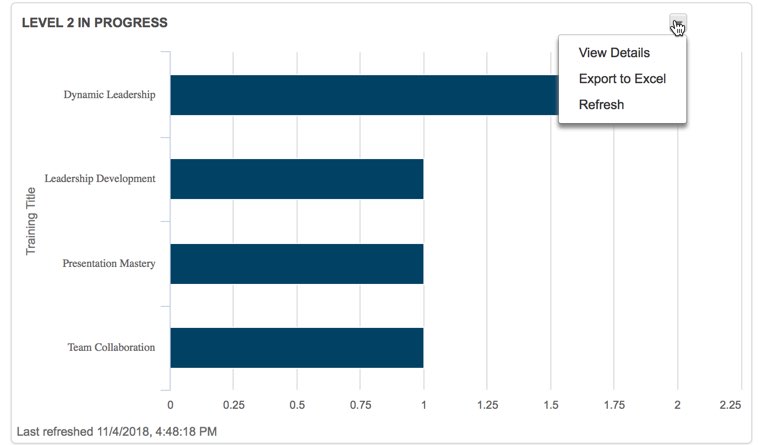
In Pathways, three Toastmasters officers are able to access Base Camp Manager. They can view individual progress. For example, this bar chart shows how many members my club has currently working on level 2. (If you don’t see anything in your bar chart, refresh.)

You can click the little arrow and view details (in a browser) or export to Excel to see which members are on which paths. You can now see which projects they have started (In Progress status) or finished (Completed status)

Additionally, on the second tab of reports, you can look at the path progress report and export a %. When you log in as a member, you see two percentages:

  1. The percentage complete within a level.
  2. The percentage complete within a path (aka across all six levels) – This is the % that shows up in the report base camp manager shows.

What’s this about six levels?

Pathways now has six levels. The five you are accustomed to plus the “Path Completion” level.

What do the percentages mean? (If you don’t like math, skip to the table at the end)

Ok, so what does this mean? Each of the six levels is worth a sixth of 100%. That’s 16.66667%. Each level has a certain number of projects. The 16.66667% is equally distributed across those projects.

Let’s start with a simple example. Suppose a member has gone in order and completed all of levels 1 and 2. That member has completed 33.333333% of Pathways which rounds to 13%

Now, suppose a member has completed the Icebreaker and Evaluation/Feedback projects in level 1. This member has two projects remaining in level 1 (Research/Presenting and Level Completion.) That means the member has credit for half of level 1 which is 8.333333%. Toastmasters appears to round up giving us a status of 9%.

But what if members don’t go in order

Now suppose a member completed the Icebreaker and Evaluation/Feedback projects in level 1 *and* the Understanding your Leadership Style in level 2. This member will get the same 8.33333% from level 1 as in the previous example. The member will get an additional 4.16667% for the level two project. Bringing the member to 13%.

For members who go in order (no math)

Note that percentages in italics are ones that I derived mathematically but haven’t yet seen in practice.

PercentageWhat it means
0%Signed up for a path, but didn’t do the icebreaker yet
5%Completed the icebreaker
9%Completed two projects in level 1
13%Completed all the projects in level 1 but needs to submit the level completion (or have it approved)
17%Completed level 1, but hasn’t yet done any projects in level 2
21%Completed one level 2 project
25%Completed two level 2 projects
29%Completed all level 2 projects but needs to submit the level completion (or have it approved)
33%Completed level 2, but hasn’t yet done any projects in level 3
37%Completed one level 3 project
41%Completed two level 3 projects
45%Completed all level 3 projects but needs to submit the level completion (or have it approved)
50%Completed level 3, but hasn’t yet done any projects in level 4
56%Completed one level 4 project
61%Completed all level 4 projects but needs to submit the level completion (or have it approved)
67%Completed level 4, but hasn’t yet done any projects in level 5
73%Completed one level 5 project
78%Completed all level 5 projects but needs to submit the level completion (or have it approved)
83%Completed level 5
92%Completed Reflect on Your Path, but needs to submit level completion
100%Path completed

For members who don’t go in order (a little math)

  • For each level the member completed, add 16.67%
  • For each project in a non completed level, add the number for that level from this list
    • Level 1: add 4%
    • Level 2: add 4%
    • Level 3: add 4%
    • Level 4: add 5.5%
    • Level 5: add 5.5%
    • Level 6: add 8.5%
  • Round up

Finally, thank you to Toastmasters phone support for letting me know the percentage was changed to accommodate out of order and the 16.67%. That gave me enough to figure out the rest.