
Last weekend, a few of the CodeRanch moderators were discussing a Trac item that we’d like to get rid of the I18N messages from our HTML. It’s there at all because open source JForum had it. We haven’t been updating it and have been using it inconsistently. Also, we do want to externalize the ones in Java which is why we can’t just get rid of the file wholesale – someone could add more references from HTML. I suggested that this would be a good thing to set up a SonarQube rule and volunteered to create the rule. This was a far harder and more interesting task than I expected it to be when I said I’d do it.
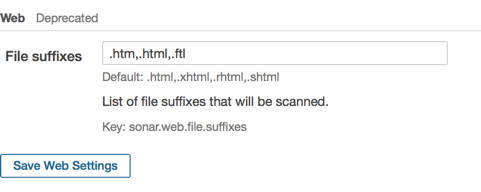
The web plugin scans HTML files and has a bunch of pre-defined rules and templates for them. You can set any file extensions you’d like so I had set “.html,.html,.ftl” in Administration > Configuration > Web to hit both our HTML and Freemarker code. Alternatively, you can set this in your Sonar properties file.
Looking through the rules and rule templates in the web plugin, there wasn’t one for what I wanted – plain String or regular expression search. Nuts! There are a few existing rules that do what I want, however I couldn’t use them:
| Rule | Why can’t use |
|---|---|
| Some Java packages or classes should not be used in JSP files | In web plugin, but only for jsp/jsp files |
| Disallowed methods should not be allowed | In Java plugin so only works for Java code |
| XPath rule | Only works for XML files |
| The text plugin regular expression rule | So close! This does exactly what I need. Except (see next section) |
Great, the text plugin meets my needs. But alas. You can only associate a file extension with one plugin for each Sonar run. The HTML/Freemarker files are already considered web files.
So what’s wrong with the text plugin?
The text plugin has a rule called “Simple Regex Match”. When configured with the proper regular expression, it does exactly what I want. Except for one huge problem. In order to use it, I have to associate the text plugin with HTML/Freemarker files. This is a two step procedure:
- In the browser, Administration > Configuration > Web – set the web extensions to “foo”. Leaving it blank is insufficient as it defaults to include HTML and Sonar does not let the same file extension be associated with multiple plugins.
- In sonar-project.properties, add the line: sonar-text-plugin.file.suffixes=.htm,.html,.ftl
You also have to run sonar-runner twice. Once with the HTML/Freemarker files associated with the web plugin to get those results and again with them associate with the text plugin to get the rule I’m trying to write. This means you need to have the code show up as two projects within SonarQube. (otherwise Sonar will tell you the rule violations were fixed for whichever analysis you run last.)
Extending the web plugin
Ok. I clearly need to extend the web plugin so that I can have a regular expression rule associated with the web plugin. The docs say the web plugin doesn’t support extending it with Java or XPath rules as does this post. I tried anyway hoping this was out of date. I was able to get my new rule to show up in Sonar, but not to run. Everything I’d need to do in order to get it to run was considered a duplicate and prevented Sonar from even starting up. For example, “org.sonar.api.utils.SonarException: Can not add the same measure twice” or “duplicate keys not allowed”. So I concede this path is a non-starter. It would have been nice to have my custom rule in a separate Maven project rather than having to fork the existing one.
Forking the web plugin
Sigh. Last resort. Time to fork. This newsgroup post pointed to a commit that shows how to add a rule to the web plugin. I wanted to add a rule template rather than a rule, but the idea is the same. It wasn’t hard to make the change within the project. It’s just that forking isn’t good in the long run as I’ll have to keep re-merging. What I needed to change in my fork:
- Add custom rule template class to org.sonar.plugins.web.checks.coding package. The code was pretty similar to the rule for illegal spaces:
package org.sonar.plugins.web.checks.coding; import java.io.IOException; import java.nio.charset.Charset; import java.util.List; import org.sonar.api.utils.SonarException; import org.sonar.check.Priority; import org.sonar.check.Rule; import org.sonar.check.RuleProperty; import org.sonar.plugins.web.checks.AbstractPageCheck; import org.sonar.plugins.web.checks.RuleTags; import org.sonar.plugins.web.node.Node; import org.sonar.plugins.web.visitor.CharsetAwareVisitor; import org.sonar.squidbridge.annotations.NoSqale; import org.sonar.squidbridge.annotations.RuleTemplate; import com.google.common.io.Files; @Rule( key = "RegularExpressionNotAllowedOnLineCheck", name = "Regular expression \"regex\" not allowed on web page", priority = Priority.MAJOR, tags = { RuleTags.CONVENTION }) @RuleTemplate @NoSqale public final class RegularExpressionNotAllowedOnLineCheck extends AbstractPageCheck implements CharsetAwareVisitor { @RuleProperty( key = "regex", description = "Single line regular expression to prohibit on web pages") public String regex = ""; private Charset charset; @Override public void setCharset(Charset charset) { this.charset = charset; } @Override public void startDocument(List<Node> nodes) { List<String> lines; try { lines = Files.readLines(getWebSourceCode().inputFile().file(), charset); } catch (IOException e) { throw new SonarException(e); } for (int i = 0; i < lines.size(); i++) { // only support matching text within a single line to facilitate identifying line number if (lines.get(i).matches("^.*" + regex + ".*$")) { createViolation(i + 1, "Replace all instances of regular expression: " + regex); } } } } - Add the rule template to org.sonar.plugins.web.rules.CheckClasses so the web plugin knows about.
- Create a new HTML file in the resources localization directory.
- Write/update tests. I like that the sonar-web-plugin project uses JUnit tests to enforce some of there conventions like rules ending in “Check”.
Where is the code?
I’ve placed my fork on Github. It’s 2.5-SNAPSHOT because I didn’t see any need to version it. I also created a pull request for the sonar-web-plugin in hopes they are interested in merging it. The plugin was last released a year ago so I imagine I’ll be using my fork for along the foreseeable future in any case. Which is fine. CodeRanch is a volunteer run website so no rules against using forked software.