
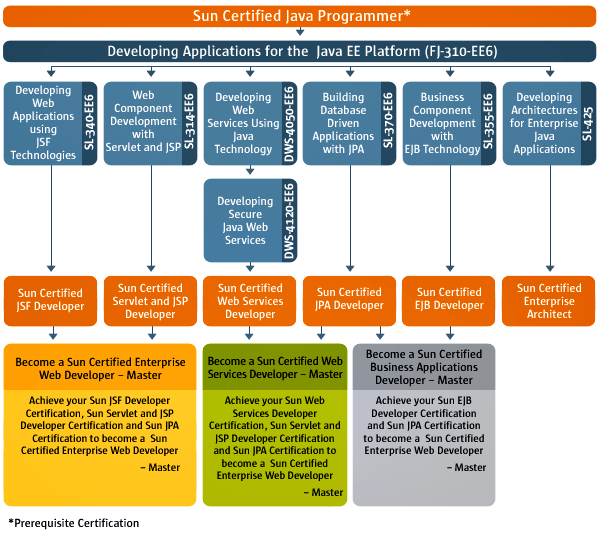
At the moment, Sun’s certification page has a preview of the upcoming JEE 6 curriculum. I’ve saved the image here in case it disappears like the SCJP Plus information did. The learning paths on Oracle’s site do gel with this info so I think it can be safely assumed this is the plan as of now.
Disclaimer: I have no affiliation with Oracle or Sun. This entire post is clues/speculation based on what is on the internet.
What is the implied mapping?
Based on the information available, the following chart shows what it looks like Oracle is planning. Below the chart, I write my evidence for each. This just addresses exam naming at the moment. I’m sure the content will change over time. Sun was looking toward changes anyway with the Programmer Plus exam for Java 1.7. For those uncertain about whether to get certified now, the name is important as is the fact that the certifications have a future.
| Current Certification name | Future Certification name |
|---|---|
| Sun Certified Java Associate (SCJA) | Same |
| Sun Certified Java Programmer (SCJP) | Same (no word on the programmer plus yet) |
| Sun Certified Java Developer (SCJD) | Not enough info to tell |
| Sun Certified Web Component Developer (SCWCD) | Split into Sun Certified Servlet/JSP developer and Sun Certified JSF developer. Add JPA to form the Master Sun Certified Enterprise Web Developer |
| Sun Certified Business Component Developer (SCBCD) | Split into Sun Certified EJB developer and Sun Certified JPA developer. Combine to form the Master Sun Certified Business Application Developer |
| Sun Certified Developer for Java Web Services (SCDJWS) | Renamed to Sun Certified Web Services Developer. Add JPA and Servlet/JSP to form the Master Sun Certified Web Services Developer |
| Sun Certified Mobile Application Developer (SCMAD) | Not enough info to tell |
| Sun Certified Enterprise Architect (SCEA) | Same |
- SCJA – As Oracle uses the words associate, professional, master and expert for their own database certification, it is unlikely they would get rid of Sun’s associate exam. While the SCJA doesn’t show up on the JEE 6 learning path, it didn’t for the JEE 5 one either. It was treated as an optional pre-requisite to the SCJP or a standalone exam. I see no reason t his exam would not continue for the forseeable future.
- SCJP – Explicitly mentioned in the JEE 6 curriculum.
- SCJD – Not part of JEE so no info available.
- SCWCD – The JEE 6 learning path shows this split into Servlet/JSP and JSF.
- SCBCD – The JEE 6 learning path shows this split into EJB and JPA.
- SCDJWS – The JEE 6 learning path clearly shows this as a renamed exam.
- SCMAD – Not part of JEE so no info available.
- SCEA – Explicitly mentioned in the JEE 6 curriculum. Continues to be independent of the other exams. (The SCJP pre-requisite has only been for training classes, not for the actual exam.)
What is implied overall?
- There are more exams in the new world. More money for Oracle.
- Exams combine to form “master” certifications in an area. This is good if you want to get certified on just part of an area. Say you don’t use JSF or EJB but want the other part of the certification.
- The word “Sun” is still in the name. This is good for Oracle as far as branding goes. Keeping Sun as a brand preserves the legacy built around the certifications. There is some precedence for this. The Hyperion and Peoplesoft certifications still have their old parent’s names.
Interesting facts:
- This image is named Java-EE-6-Curriculum-Path_option2.gif. Option 1 is not available on the web server, but is shows some thought has gone into the new certifications. While these are class listings rather than certification details, but still give some insight into the thinking going forward.
- Oracle’s learning paths show the difference between JEE 5 and JEE 6. (When clicking the links, you may have to choose a country and then go back to click the link again.) The fact that they mesh with the roadmap on Sun’s site shows good consistency.
- Oracle’s learning path for core Java is the same. It still shows the programmer, developer and mobile paths. It hasn’t been updated in a while so we can’t assume much from this.
- We know Oracle is planning JEE 6 exams under the Sun branding. They are currently advertising betas for the Sun Certified EJB Developer and the Sun Certified JSP and Servlette Developer. And no, that’s not a typo. Oracle seems to think “Servlet” is spelled “Servlette.”
What’s next?
Only time will tell. Until Oracle announces things, all we can do is look for clues.