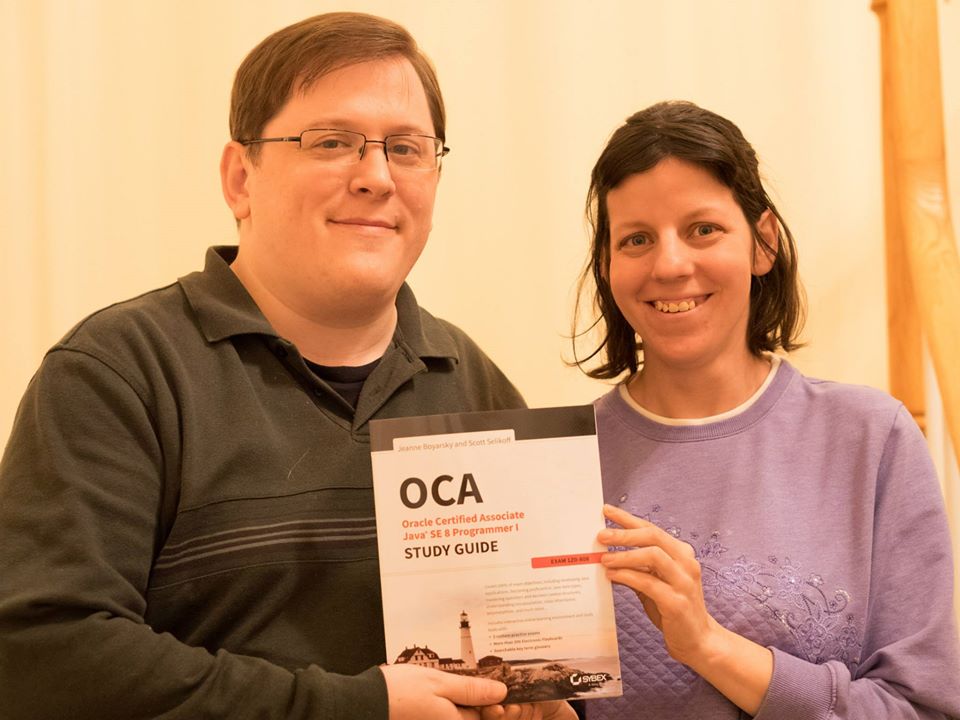
what it was like writing a book

Last month, I got to give a ten minute speech at work about what got me to write a book and what it was like. I then gave a shorter version of it as a Toastmasters speech. The highlights seem like a good blog post. Along with a good number of more detailed points I had to omit due to time.

Getting there

  1. Over a decade ago, my teammate, Chris, asked me if I’d ever write a book. I went to a fairly animated response about there is no way I’d ever write a book because it is so time consuming. And here we are. He knew before I did. (It’s good to have a mentor that knows you better than you know yourself.)
  2. Busy people attract time consuming hobbies. After I finished grad school, I started blogging and mentoring. Moderator at CodeRanch.com. Oh, and writing lots of book reviews. Starting with Java 4, I also presented to people at work about new features in Java.
  3. My mind shifted from “no way” to “maybe someday.”
  4. I was still afraid at the time commitment, but curious about the process.When Martijn and Ben asked me to tech proof “The Well Grounded Java Developer” I said yes to learn about the process. It was interesting. I also proofed Manning’s OCA Java 7 Study Guide which was a different experience because I didn’t already know the author.  Also, getting to write tghe foreword reminded me that I did want to write a book someday.
  5. At this point I shifted from “maybe someday” to “I’d seriously consider it if the right opportunity presented itself”. I had been approached for two other books, but they weren’t the right opportunity.
  6. When Bert was looking for contributors to K&B 7, I jumped at the chance.  “Interviewing” with Bert was scary because I admired him so much. (In hindsight, I don’t think it was an interview, but I was certainly nervous enough for it to be one.) I learned a lot from Bert; he’s a great mentor. I also gained confidence because I got asked to write 1.5-2 chapters essentially half a chapter at a time. The first one felt like “taking a chance on me.” The last two groupings felt like I had earned it. I also learned my writing velocity which was huge for being able to commit to actually writing a book.
  7. My friend Erik and I talked about writing a book together. We wrote table of contents and the beginning of chapter one. Even though we didn’t proceed, it was good to have a practice run at organization. I used github to organize things. Knowing how I would so greatly happened when it came time for this book.

Previous work for Wiley

Michael Ernest asked me to tech proof his book “Java SE 7 Programming Essentials“. I didn’t get to due to, well bureaucracy in multiple places. I did learn to avoid that bureaucracy the next time the opportunity came up. Michael asked me to tech edit his next book with Wiley. I signed a contract. Then the book didn’t get written. Note that the only work I have done for Wiley at this point is sign a contract.

The right opportunity

As I sat in “I’d seriously consider to right opportunity, but not seek it out” mode, two publishers approached me. Both were big name tech publishers. One was an update of an existing book. There would have been new chapters about Java 8 that would be mine. And a lot of pruning/updating. The other was the one I choose. I did talk to a contact at both publishing houses before deciding. I also talked to the author of the previous edition (for the one I didn’t choose) and Michael Ernest for the one I did. I wanted to see why they didn’t want to do it. Just like coding, a greenfield project is often more fun and that’s what I went with on the book. I also had just finished working on Bert’s book and wanted the opportunity to have my own style.

When I spoke to Wiley on the phone, the acquisitions editor referred to “my previous work with Wiley.” That’d be the contract a signed that was later cancelled? Glad to know that shows I’m reliable. I imagine/hope that Michael vouching for me meant more than that meagre work experience.

I asked Scott to co-author with me. We had talked about writing a book together years ago and it’s always been a running joke/something that might happen one day. He was therefore my first choice as co-author.

Tools/Tech

  1. Github source control – For both example code and the book files
  2. Github tasks/issues – For managing deadlines/tasks/bugs/etc. I wrote a Spring/OAuth web service to automate this.
  3. Github wiki – For links, phone numbers, etc
  4. This blog – For announcements
  5. Jenkins/Selenium/XPath – For when Oracle changes the objectives
  6. Pomodoro Timer – To remind me both to stay focused and take breaks/look away from the computer

Win a free copy of our book!

Scott and I are doing a book promotion at CodeRanch this week.

Post in the OCAJP forum between now and Friday and be entered to win a free copy. The four winners will be announced on Friday.

Plus you can ask Scott and I questions about the book – content, what it was like writing, how we approach the exam, etc.

using Nashorn’s jjs for experimenting

In Java 8, Oracle introduced the new Nashorn engine and is encouraging the use of jjs. It’s a RPEL (read print evaluate loop) for JavaScript. Since JavaScript can call Java, this allows experimenting with Java APIs like you do in other languages like Python and Ruby. It works better in those languages though.

Cay Horstmann’s book, Java SE 8 for the Really Impatient, had good exercises for lambdas so I decided to the end of chapter exercises for Nashorn.

Exercise 1 – Play with jjs to experiment with an API you want to explore; did you find it easier than writing test programs in Java?

Nope. The so called advantage of using jjs is that you don’t need to write the plumbing code. But an IDE can generate a class and main method in a couple clicks.

  1. Strike 1 – With jjs, I need to type in the package of name of classes I want to use rather than just letting Eclipse deal with imports for me.
  2. Strike 2 – jjs doesn’t have tab complete (autocomplete) which means I have to type in the full class/method name of the class I am experimenting with. If I was an expert, I wouldn’t be in jjs in the first place.
  3. Strike 3 – jjs doesn’t support the up arrow. Which means when I make typos (see strike 1 and 2), I get to type the whole thing again.

Exercise 2 – Using JJS and the stream library iteratively work out a solution to the problem to print a filtered list of unique long words in sorted order and see how it compares to your usual workflow.

Here was my workflow with jjs:

  1. Create the test file in a text editor
  2. Run ./jjs
  3. Create a path object
    Attempt # Code Error Comments
    1 jjs> var paths = Paths.get(‘path/words.txt’) <shell>:1 ReferenceError: “Paths” is not defined Forgot to type the package name. Don’t know it by heart anyway. Need to look it up in the JavaDoc.
    2 jjs> var paths = java.nio.file.Paths.get(‘path/words.txt’) Success
  4. Read the file
    Attempt # Code Error Comments
    1 jjs> List<String> list = java.nio.files. Files.readAllLines(path) ECMAScript Exception: ReferenceError: <shell>:1:11 Invalid left hand side for assignment It’s JavaScript, not Java so no type declaration. Should just use var.
    2 jjs> var list = java.nio.files. Files.readAllLines(path)  <shell>:1 ReferenceError: “path” is not defined Typo in variable name. I wish I named it path, not paths. But I want to do the exercise in order and not go back.
    3 jjs> var list = java.nio.files. Files.readAllLines(paths) java.lang.RuntimeException: java.lang. ClassNotFoundException: java.nio.files. Files.readAllLines Typo in package name. It should be file and not files
    4 jjs> var list = java.nio.file. Files.readAllLines(paths) java.lang.RuntimeException: java.nio.file. NoSuchFileException: path/words.txt Missing forward slash in path name. On the bright side, I can rename the variable without feeling like I’m messing up the experiment.
    5 jjs> var path = java.nio.file. Paths.get(‘/path/words.txt’) Worked as expected (but at this point, I’m typing into this blog post and copy/pasting into the jjs console
    6 jjs> var list = java.nio.file. Files.readAllLines(paths)  java.lang.RuntimeException: java.nio.file. NoSuchFileException: path/words.txt Sigh. Didn’t use the corrected variable name
    7 var list = java.nio.file. Files.readAllLines(path) Worked as expected
  5. Filter the long words
    Worked.

    Attempt # Code Error Comments
    1 jjs> list.stream().grep({ l -> l.length() > 12}) ECMAScript Exception: SyntaxError: <shell>:1:23 Expected : but found – This is completely wrong. Aside from the stream() call, it is using Groovy syntax. (I code Groovy at a command line so my fingers started there)
    2 jjs> list.stream().filter( l -> l.length() > 12) ECMAScript Exception: SyntaxError: <shell>:1:30 Expected an operand but found Hmm. Puzzled. it looks right this time. I copy/pasted into my IDE and it compiled. I then started searching online and found out that you have to use a function literal. (This was in the book. I forgot about it)
    3 jjs> list.stream().filter(function(e) { return e.length() > 12 }) Prints reference to stream (as does Java.) Now can add the print
    4 jjs> list.stream().filter(function(e) { return e.length() > 12 }).forEach(System.out::println) ECMAScript Exception: SyntaxError: <shell>:1:79 Expected , but found : Not surprised that :: doesn’t work since -> doesn’t. Now for the long way.
    5 jjs> list.stream().filter(function(e) { return e.length() > 12 }).forEach(function(e) { print(e) }) Works as expected
  6. Add sorting, uniqueness and refactor
    Attempt # Code Error Comments
    1 jjs> list.stream().filter(function(e) { return e.length() > 12 }).sorted().forEach(function(e) { print(e) }) Sorting worked
    2 jjs> list.stream().filter(function(e) { return e.length() > 12 }).sorted().distinct().forEach(function(e) { print(e) }) Uniqueness filter worked
    3 jjs> list.stream().filter(function(e) e.length() > 12 ).sorted().distinct().forEach(function(e)  print(e) ) Remove unneeded code

 My thoughts

That was so far away from being easier that it was ridiculous.  I’m comfortable with the NIO and lambda APIs. This shouldn’t have been hard. The Java version is:

import java.io.*;
import java.nio.file.*;
import java.util.*;

public class Exercise2 {
   public static void main(String[] args) throws IOException {
      Path path = Paths.get("/path/words.txt");
      List<String> list = java.nio.file.Files.readAllLines(path);
      list.stream()
                .filter(l -> l.length() > 12)
                .sorted()
                 .distinct()
		.forEach(System.out::println);
     }
}