
rain plans and flexibility at maker faire

Maker Faire was interesting in that we got to use our contingency rain plan for the second time. My friend Norm and I coordinate the FIRST robotics tent at Maker Faire. The first time we used our rain plan was in 2013 where it poured overnight. See some pictures of all that water. Maker Faire was over 3 months ago. (I’ve been really busy writing my OCA book.)
2014-maker-faire

This time, I wasn’t expecting it to rain overnight so didn’t cover everything. It did rain.  I was advised afterwards to follow NWSnewyorkny on Twitter so as not to get caught by surprise again.

I got there early on Sunday morning to make sure things were in good shape and set up the tables. (We do put away flyers and the like.) I found puddles all over. Eek! I also found that the cloth bags containing many of the supplies were wet. As was the roll of paper towels I had left there. Eek! Eek!

The first thing I did was take out two plastic tablecloths. They were in sealed bags  since I hadn’t used them before. I put them on top of the tables so I could start unpacking without getting things wet.

I also learned that a moist paper well can still be used to mop up puddles of water. They don’t make things bone dry, but certainly help. Norm brought dry rags which helped. I also learned just how many dry surfaces there were – from chairs to plastic wrappers we didn’t need any more.

Lessons learned:

  1. Know the weather
  2. Cover up even if the slightest chance of rain
  3. Be creative in finding dry surfaces

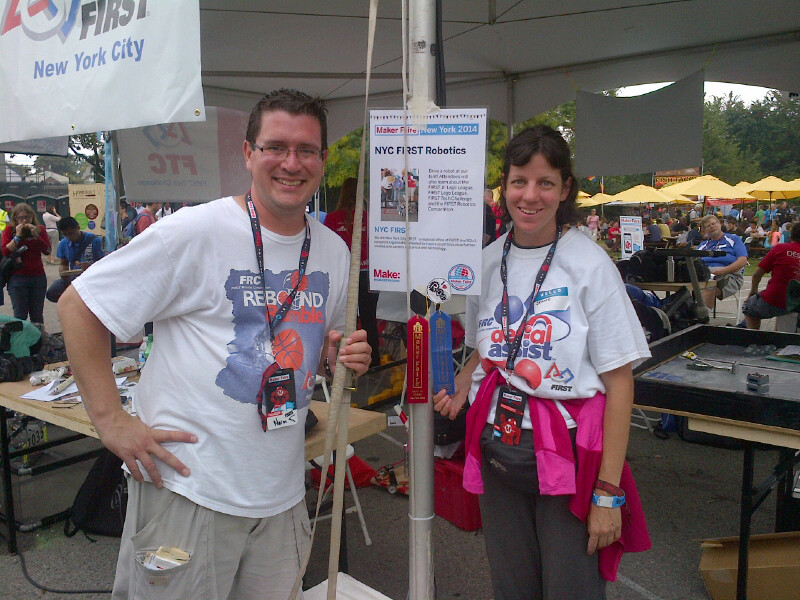
The pictures is Norm, myself and two ribbons. We won an editors choice ribbon again. We also won a Best in Class (Education) ribbon for the first time. Exciting!


running out of bandwidth on a 4g chromebook

My mother has had her new 4G Chromebook for a few weeks now. I subscribed to the same $20 for 1GB plan as before. (Well technically there was a 100MB bonus on the old 3G plan.)

The first month was fine of the plan was me playing with it at home (mostly on wifi) and my vacation to visit her. This month was the first real month of her using it. She never ran out of bandwidth with the laptop and did the first month with the new one. How suspicious. I called Verizon and learned:

  1. Verizon offers text/email alerts on usage thresholds, but not for Chromebook pre-paid plans. In other words, useless to me.
  2. There were two days where she “used” over 200MB. And was online for over two hours. I’m not sure I believe Verizon on that, but I have no evidence to the contrary.

Here’s what we are doing to fix/troubleshoot.

Keep a log

I asked my mother to track her internet usage for a month or two so we can gather more data. She is to track the time she goes on/offline and what she does when online.

Turn off the Chromebook when not in use

I’m not sure if I’m right to be worried about someone piggybacking off her signal, but I told her to turn off (shut down, not sleep) the laptop when not online. This way we can get an accurate pictures of when she is online.

Turn off Flash

Since videos are large, I’m wondering if a website she went to uses Flash for video ads. I asked her to turn off Flash. She never watches videos so this won’t impede her experience.
  1. Type chrome:plugins in the address bar
  2. Scroll down and find the entry for Adobe Flash
  3. Click the disable link
Turn off extra bandwidth “helpers”
I’m concerned that the pre-fetching/pre-loading pages is wasting too much bandwidth. So turning that off. I don’t think the URL completion is significant, but just in case…
  1. Chrome Settings
  2. Show advanced settings
  3. Scroll down to the privacy section and uncheck
    1. “Use a prediction service to help complete searches and URLs typed in the address bar or the app launcher search book
    2. Predict network actions to improve page load performance

What do you think?

Any other ideas for what to do? She’s using a 4G plan exclusively (only going to visit a wifi connection once a month or two when an update comes out). She doesn’t watch videos and has never been a bandwidth intensive user before.

I will say that I’m glad this is a pre-paid plan where they cut you off rather than simply charging for overages.

toastmasters – a different table topics

When I was an area governor, one of my clubs complained that meetings weren’t fun enough. I tried a few things including some different formats for table topics to mix things up. One of them resulted in a lot of laughter. I’ve done it twice since at my own club.

The approach

I wrote sets of five words on a piece of paper. I tried to pick words that had nothing to do with each other. I also tried to pick a word or name that meant something to the club to create a shared reference. For example, suppose the President of the club was named Bob and the words were:

  1. elephant
  2. Kansas
  3. necktie
  4. sofa
  5. Bob

I then had people get up in pairs. The first person was told to speak for 60-90 seconds telling a story that uses those five words. Then the other person had 30-60 seconds to “agree” and support the story as if they were there. For example, suppose the first person said they saw an elephant wearing a necktie. The second person could say that he ran into the first person at the zoo, saw the elephant and couldn’t believe it.

Why it works

Putting together random words into a story tends to be funny whether the speaker is funny or not. Sticking in the shared experience (person’s name, company specific info, etc) makes people laugh as well. It preserves the spirit of speaking impromptu. It also creates a faster rhythm.