
openscad – a cross between programming and cad – with AI

I’m making a birthday present that is a 3D printed object. It’s for someone who has everything she could possibly want so I’m going with something that has meaning. I’ve made simple 3D objects in TinkerCad. I’ve made minor customizations to things on thingiverse. I don’t have the artistic skill to make what I want here. (Not saying what it is because I want to actual present to be a surprise).

I was thinking about paying one of the members of StuyPulse robotics to create a stl file for me. But I also wanted to make it. I asked ChatGPT for ideas in hopes that there was an AI plugin that could help me. There was something even better!

OpenSCAD

ChatGPT is able to create documents in the format used by openscad.org. This is an open source CAD modeler. And the best part is that you use a text based programming language to specify what you want so my hand eye coordination when it comes to art is a non-factor!

For example, this is a part of my final product. I can control all the variables (and the text) in c code. I’m a programmer; I’m good at that. (ChatGPT did not give me the heart; it did get me started with how to get text in the desired location. I am perfectly capabie of entering a Unicode heart myself)

    translate([0,0,base_thickness - text_depth])
        linear_extrude(height=text_depth)
        text(
            "♥︎︎",
            size=24,
            halign="center",
            valign="center",
            font="Liberation Sans:style=Bold"
        );

What do i think of the tool?

I love the rapid preview feature. It’s poor quality rendering (lots of random extra lines), but let me quickly try things to get what I wanted. Then you have to render it which takes forever. Luckily, the tool makes a chime when done because I had plenty of time to start doing something else and forget about it. After that, exporting to an STL was fast.

I looked at reviews online and they were mixed. The people who were unhappy with it felt it wasn’t powerful enough for their needs. It was perfect for mine.

Using AI to help me

Using AI as a pair programmer here was super helpful. Remember I hadn’t even heard of this tool until I started this project. And its not a language I feel the need to become an expert in. AI was able to get me started and suggesting things I might want to do next. It was able to teach me how to change the code for some of the changes. (Which was enough for me to make other changes without AI.) I wound up doing a large number of edit/preview cycles which is how i code – tiny increments and see where things stand. I like that I didn’t one shot the cad because I still feel like I was involved in the coding process. And I did write some code by hand which is satisfying to me. Plus this came way better than if I had tried to do it by hand in TinkerCad. I was able to customize one of the key modules to have a better shape than that AI came up with.

I did three full render/generate stl cycles to see what it looked like and edited by hand until satisfied. The final product is bigger than my personal 3D printer can handle so I sent it to VoodooMfg for printing. (This also allows me to use a material I don’t own so it can be a little stronger). I’ve used them in the past for this type of thing and am satisfied with the result. Also, they are in New York City (Brooklyn to be specific) which means even the cheapest shipping with USPS is pretty fast). Fun fact: many years ago used to be an option to pick up your print in person. It was so cool to see their factory with so many 3D prints!

What I’m paying to print it costs about what I’d have spent on a gift. But this is so much more meaningful!
More important skills/traits in becoming a computer programmer

One of students on the FIRST robotics team I mentor asked “what do you think is the most important skill or trait in becoming a successful computer programmer?”. I wrote a paragraph about persistence, problem solving and attention to detail commenting I’d choose problem solving if I could only pick one. I also immediately thought this would make a good blog post. So expanding on my top three and also commenting on how these are all important even as AI does more of the coding.

Persistence

Persistence because it feels like you are an hour from being done for days if work. Often when something doesn’t work, there are many possible causes. You have to do experiments to rule causes in or out. Getting frustrated is stressful and doesn’t result in the problem getting solved. Persistence lets you keep plugging away at it. This is especially important when there is a tight timeline or a production system is down. You know you have to get it done quickly even if it feels like you have no idea how close you are.

AI impact: Not taking the first answer to a question or the first code that gets created is a form of persistence. Adding details and trying new things to get what you want still matters. Similarly, I’ve gotten AI to give me leads I might not have thought of by using a variety of prompts.

Problem Solving

Problem solving because that’s essentially what we are doing. Getting a computer to do what we want. Taking a bigger problem, identifying smaller ones, coming up with alternatives on how to solve it – all of these require problem solving ability. I’ve often said that I enjoy doing software development because we get paid to solve problems and do puzzles. While they aren’t called puzzles, once you identify the constraints and rules, getting a solution that fits in them feels a lot like a puzzle.

It doesn’t have to be programming either. I am volunteer coordinator for the NYC FIRST Robotics Competition. Making as many people in their volunteer assignments is an interesting puzzle I get to do every year. I’ve used that skill a few times at work when creating teams for team building activities – creating rules to maximize networking while keeping the teams balanced according to a variety of factors.

AI impact: As you advance in your career, problem solving becomes more important. When you start out, the problems are smaller and tasks come with clearer instructions. I think AI makes problem solving a larger portion of the job earlier in one’s career. You spend less time on syntax and more time in specifying what you want and figuring out why it doesn’t work.

Attention to Detail

Attention to detail because getting one line of code or one setting wrong makes the entire thing go klaput. Whether it is reading an APIs documentation or identifying small differences or thinking of every edge case, attention detail is a key skill. Last week, I was in a rush and trying to figure out why my unit test was working on my machine but not on the build server. I suspected a typo but was tired and didn’t see it. I was also too worn out to think of case sensitivity. (If i had, I’d have done a text compare). Instead, I asked a teammate who is the most detail oriented person on the team. I wasn’t even done explaining what was wrong when he said “does the case matter.” Yup!

AI impact: In the past people used books and reference sheets. Then search engines. Now AI. With all of these, you have to deal with situations where noticing small differences can make a huge difference in your productivity.

What does ChatGPT “think”?

After writing this, I asked ChatGPT to see how my answer as an experience professional compares. ChatGPT noted the most important skills for a beginning/early career programmer are ones to help learn, build confidence and develop good habits early. ChatGPT then identified seven.

The top three were the same as the ones I picked. After that were curiosity/willingness to learn, basic technical foundations, communication/help seeking and enjoyment/playfullness.

I agree with these. I didn’t put technology in my answer because the language you learn isn’t the important thing. Technology changes quickly. I do agree that the foundations matter because it enables you to work with any technology.

Interestingly two of the items showed up in my explanations of other items showing I clearly think they are important: help seeking (asking my teammate about the casing issue) and enjoyment/playfulness (we get paid to solve problems/puzzles)

NYC Bus Redesign and a Coding Problem

NYC is updating the MTA (metropolitan transit authority) bus system this summer with one set of changes taking effect today and another taking effect in about two months. How it went from my point of view:

The plan

There were four plans. Lesson: don’t call something the final plan or you have run out of names. My friends and I were wondering what they would call the real final plan “Final final”? They went with “Final Plan Addendum”. I will say the plan was well socialized and communicated.

  • 2019-2021: Draft Plan
  • March 2022: New Draft Plan released
  • December 2023: Proposed Final Plan released
  • December 2024: Proposed Final Plan Addendum released
  • January 2025: MTA Board approved the Proposed Final Plan Addendum

Leading up

For the most part, the MTA was good with signage. Signs for the new bus routes went up early. Existing stops had yellow signs saying if the stop would cease to be a bus stop or if the route was changing. In my neighborhood, there was a campaign a few weeks back in person to make sure people knew.

First day: bus stops

On one of the routes near me, two bus stops with bus shelters are no longer bus stops. One of them is no longer on the bus route. The other is, but not a bus stop. Drivers were good about letting people get on there and letting them know the bus stop moved.

The new bus stop in between these two stops had cars parked there overnight. (There was a sign that said no parking starting Sunday but it was hard to see.) That cleared up over the course of the day. Now, there’s a nice line of people waiting at the bus stop.

It’ll be interesting to see when the MTA takes down the old misleading bus shelters and if they build on at the new one. (I can see the new bus stop from my window so I’m particularly interested in what happens there.)

A new bus route

There’s a new bus route that goes limited stop from 1 or 2 blocks from my apartment to a number of areas that I go. (Whoo hoo! I don’t have to transfer buses to go there anymore. This is going to be great in the winter.)

Wait: did I say 1 *or* 2 blocks. Why yes, I did. The last stop of the new bus route is across the street from my apartment. The first step is … somewhere. According to the MTA it is a t a street corner two blocks away. The apartment building as a sidewalk tent (a type of scaffolding) and there doesn’t appear to be a bus stop there. One bus driver thinks the new bus is sharing a stop with another but even though there isn’t a sign for it there. It’s also possible it loads at the last stop.

This bus only runs every half hour on weekends and I wasn’t prepared to just miss it by waiting at the wrong place. The second stop is only a few blocks away so I waited there. I was fourth on line suggesting I was not the only one with that confusion. The bus came into the second stop with about a dozen people on it. They weren’t sure where the first stop was supposed to be nor was the driver.

I took this same bus home. Where the driver got confused and couldn’t find the last stop. While it is clearly marked, it is the break area for that bus and another one. The other bus was in front of the sign so the driver couldn’t see the stop and pulled onto a side street to look for the non-existent first stop. Which he couldn’t find either.

This feels like growing pains though. Overall, I was happy with the rollout.

Coding bug

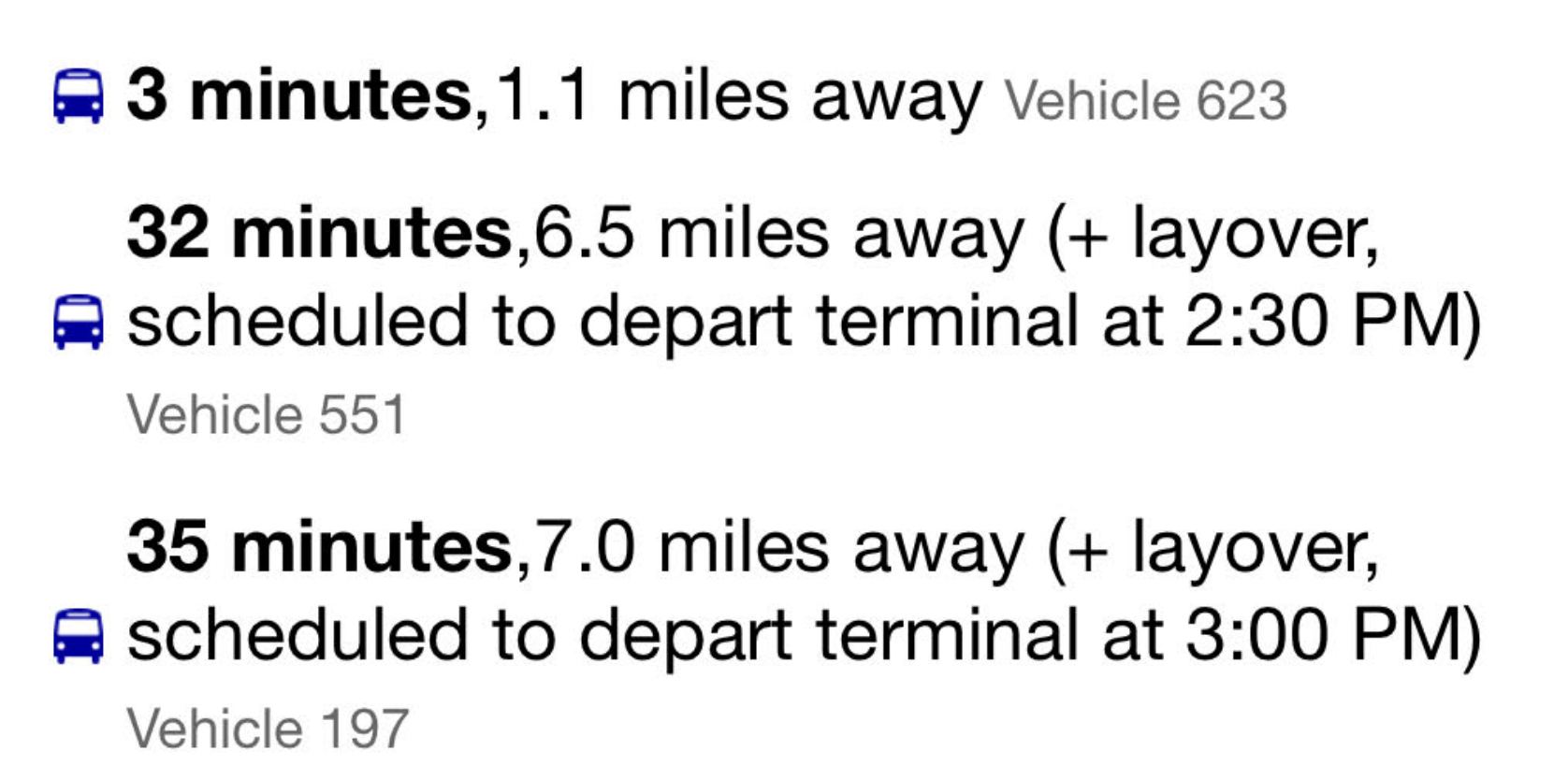
The MTA runs a website where you can see when the bus is coming with real time info. It is mostly correct. And then every once in a while you get something like the following. (I’ve seen this problem before so it’s not related to the redesign.

One bus was “3 minutes” away. and just over a mile away. (This is a street where you can go 25 miles per hour and has a lot of lights. You can’t go a mile in 3 minutes unless you catch every light and nobody wants to get on or off the bus.) I find the distance to be more accurate than the time for routes in progress. Regardless, it’s close and clearly worth heading to the bus stop.

The next bus is about 30 minutes later and the scheduled to depart terminal time is right at 2:30. The depart terminal for the next one is also right at 3pm. However, if you’ve mastered elementary school math, you might notice that a bus that leaves 30 minutes later is not arriving 3 minutes later (35-32).

The distance away is also interesting. The whole route is a little over 7 miles. And neither bus has left the terminals. Puzzling me where the number of miles away came from.